Security researchers at Trend Micro documented a malvertising campaign that abused Claude's shared-chat feature — the function that publishes a conversation at a real claude.ai link. Attackers ran Google Ads for popular AI tools, then sent people to genuine claude.ai pages showing a fake "Apple Support" chat that told them to paste a command into Terminal to fix an issue. The command installed an infostealer (on macOS, MacSync) that steals saved passwords, cookies and crypto wallets. The domain was real, the padlock genuine — so "check the URL" failed. The rule that still works: no legitimate company fixes your computer by having you paste a command into a terminal. Claude was not hacked; a feature was abused, and Anthropic disabled the malicious pages once notified.
Let me be honest before anything else: I use AI tools every day, and I think they're one of the most genuinely useful things to happen to ordinary work in a decade. That's exactly why this one unsettled me. The scam didn't fake a trusted website. It lived inside one.
The three rules we were all taught
If you've ever read a "how to stay safe online" guide — or written one, as we do — you know the core checklist by heart. It comes down to three habits:
This advice has protected people for two decades. Here's the uncomfortable part: in the campaign Trend Micro described, all three passed — and the danger was sitting on the other side of every one of them.
What actually happened, per Trend Micro
The mechanics are almost elegant, in the way the best cons are. People searched for an AI tool — Claude, ChatGPT's Codex, Perplexity, Cursor, JetBrains — and clicked an ad. The ad led to a link that was real: it opened on claude.ai, a domain your browser trusts, with no warning and a genuine padlock.
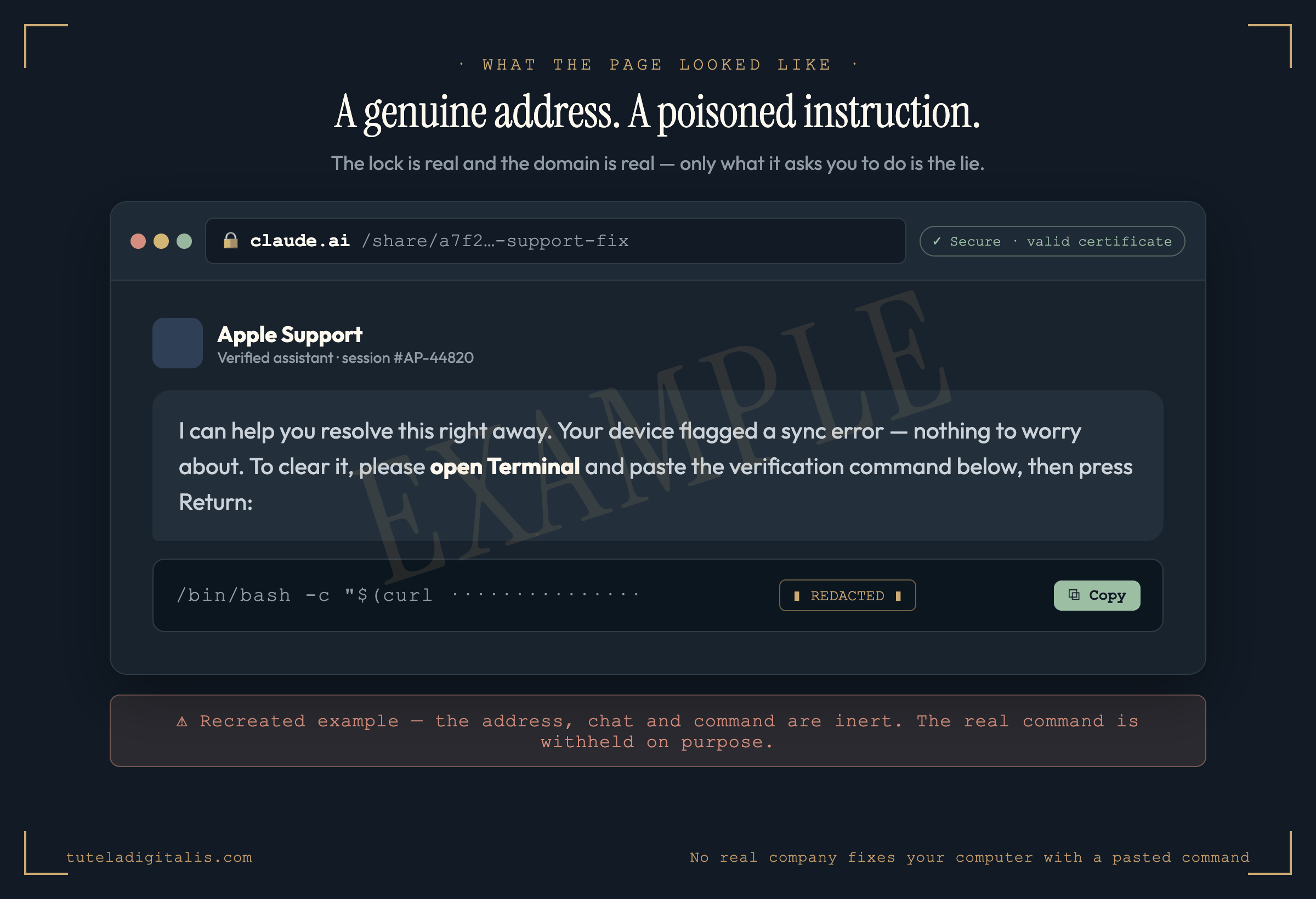
What loaded was a shared Claude conversation — the ordinary feature that lets anyone publish a chat as a public page on claude.ai. Except this conversation was dressed up as an "Apple Support" exchange, calmly walking the reader through "fixing" their problem by opening Terminal and pasting a single line. That line fetched and ran software that, by Trend Micro's account, emptied saved passwords, cookies and crypto wallets into the attackers' hands.
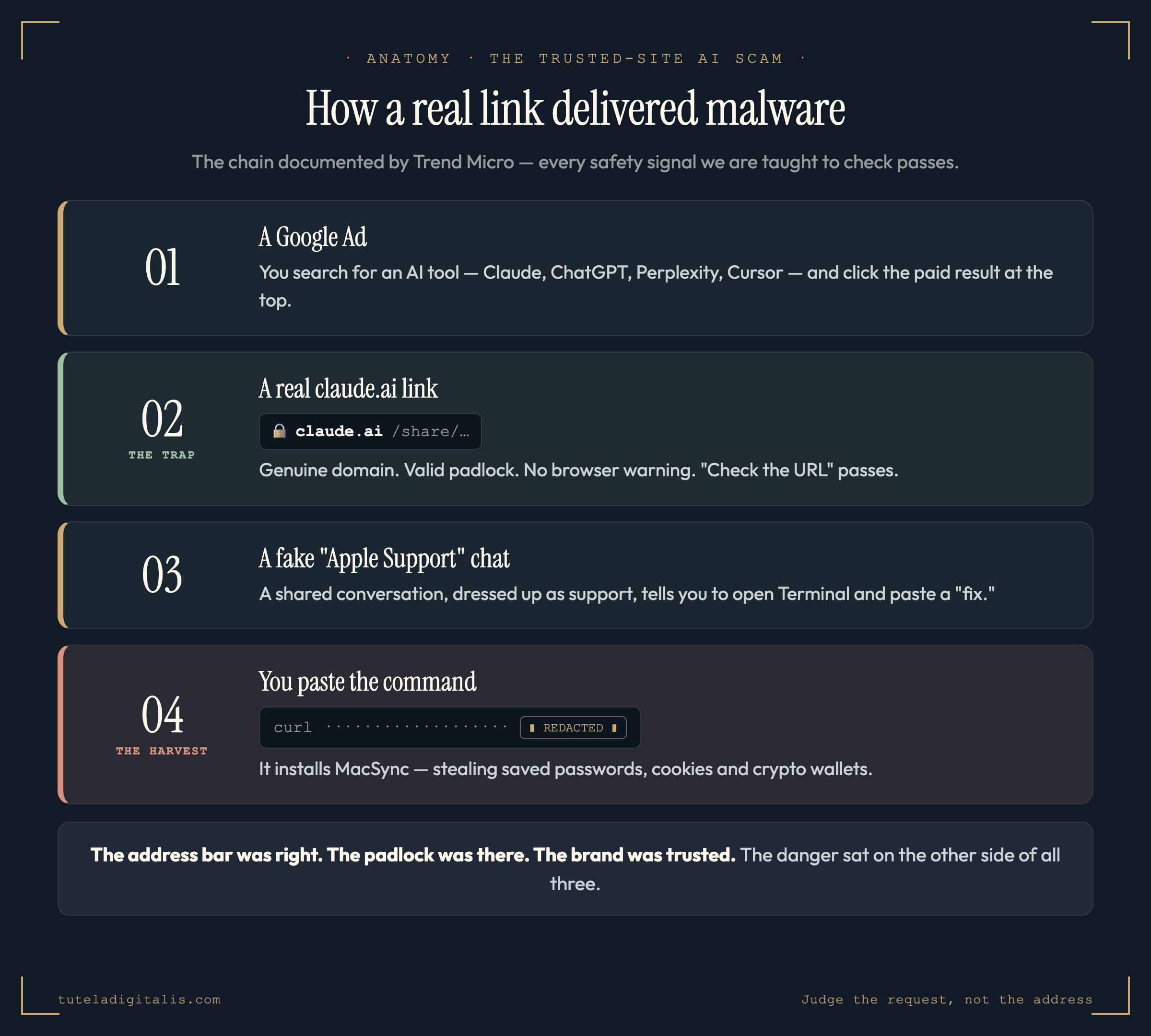
Notice what just failed. The address bar was right. The padlock was there. The brand was one you trust. Every signal we were taught to check passed — and that's not a flaw in the advice so much as the end of an era for it.
Why "check the URL" quietly stopped being enough
The old rules all share one hidden assumption: that a trustworthy place means a trustworthy message. For years that held, because hosting something on a real, reputable domain was hard for criminals to do. So "is this the real site?" was a decent proxy for "is this safe?"
What this campaign shows is that the proxy has broken. When a platform lets anyone publish a page on its trusted domain — a shared chat, a shared document, a hosted file — a scammer can rent that trust by the link. The certificate is real. The domain is real. Only the content is hostile, and content is the one thing the padlock was never checking.
The rule that replaces it
If the address bar can lie, you need a test that doesn't depend on where you are — only on what you're being asked to do. Here it is, and it's narrow on purpose:
No legitimate company will ever fix your computer by having you paste a command into Terminal or PowerShell. Apple doesn't. Microsoft doesn't. Your bank doesn't. If a page or a "support agent" tells you to copy a line and run it, that is the scam — in full. Close the tab.
This is the heart of a technique researchers call ClickFix: the con doesn't sneak the malware past you, it talks you into installing it. By making you the one who runs the command, it sails past every download warning and "are you sure?" prompt your computer would otherwise throw up. The line is usually scrambled so it looks like a harmless verification step. It isn't. The damage is done the instant you press Enter.
This isn't a reason to fear AI
It would be easy to file this under "see, AI is dangerous," and I don't think that's the honest read. The AI didn't do anything. A sharing feature — the same kind email, docs and chat apps have had for years — was pointed at a malicious page, and the moment researchers flagged it, Anthropic banned the accounts, took the malicious conversations down, and moved to tighten the feature against this abuse. That's roughly how the system is supposed to work.
What changed isn't that the tools turned on us. It's that "trust the source" — the instinct underneath every safety checklist most of us carry — needs its second half back. The source can be real and the request can still be poison. So judge the request.
If you take one habit from this piece, take this: a real domain is not a promise that what's on it is safe. The padlock secures the connection, not the content. The next time any page — however trusted its address — tells you to paste something into a terminal to "fix" or "verify" anything, you already know what it is. Close the tab, and go to the brand the way you'd find it yourself.
Saw a "paste this to fix it" page and not sure? Let's look at it together.
Send us the link and what it asked you to do. A real expert reviews every case and replies within 24 hours. Free, confidential, no pressure.
Common questions about the trusted-site AI scam
Was Claude or Anthropic hacked?
No. This is an important distinction. Per Trend Micro, attackers abused a legitimate feature — Claude's shared-chat pages, which let anyone publish a conversation at a real claude.ai link — to host their fake 'support' instructions on a trusted domain. No system was breached and no AI model was compromised. Once Trend Micro's researchers reported it, Anthropic banned the accounts, disabled the malicious shared conversations, and moved to add mitigations against shared-chat abuse. The lesson isn't that the tool is dangerous; it's that a trusted domain can be rented to host a lie.
How did a real claude.ai link end up showing a scam?
Claude, like many chat tools, lets you share a conversation as a public page hosted on its own domain. Attackers created conversations dressed up as an 'Apple Support' chat that instructed the reader to fix a problem by pasting a command into Terminal, then published those as shared links. They ran Google Ads for popular AI tools so that searching for one could surface an ad leading to one of these real-but-malicious claude.ai pages. To your browser the page is exactly what it claims to be — a genuine claude.ai URL with a valid certificate — which is precisely why it slips past every 'check the address bar' instinct.
What is ClickFix and why is it so effective?
ClickFix is a social-engineering technique where the victim is told to fix a supposed problem by copying a line of text and running it themselves — in Terminal on a Mac, or PowerShell/Run on Windows. It works because it converts the victim into the person who installs the malware, sidestepping download warnings and 'are you sure' prompts entirely. The command is usually obscured (often base64-encoded) so it looks like a harmless 'verification' step rather than what it is: an instruction to fetch and run hostile code.
What did the pasted command actually do?
According to Trend Micro, the command fetched and ran an infostealer — on macOS, malware tracked as MacSync — which harvests saved browser passwords and cookies, SSH keys, and cryptocurrency wallet data, then sends them to the attackers. We are deliberately not publishing the command or its structure. The takeaway is the behaviour, not the payload: if a page talks you into running a command, the damage is done the moment you press Enter, whatever the specific code does.
What's the one rule that still protects me?
No legitimate company will ever fix your computer by having you paste a command into Terminal or PowerShell. Apple doesn't. Microsoft doesn't. Your bank doesn't. Real support walks you through settings, sends you to an official app, or has you call a number you looked up yourself — it never hands you a line of code to run. If a web page or a 'support agent' tells you to copy something into a terminal, that is the scam, in full. Close the tab. This rule holds even when the URL, the padlock and the brand all look perfect — because, as this campaign proved, they can be.
Sources & further reading
Every fact in this piece is drawn from these sources. Click any to verify.