To get a scam website removed, report it up the stack — to the four parties that can actually act, not just log it. (1) The browser safe-lists: Google Safe Browsing and Microsoft SmartScreen. One form each, and a red warning page appears in Chrome, Safari, Firefox, and Edge — protecting almost everyone, fast, even before the site is gone. (2) The site's registrar and hosting provider, found with a free WHOIS lookup at lookup.icann.org — the only parties who can pull the domain or the server, reached at their abuse@ address. (3) The brand it's impersonating, which likely runs a takedown team. (4) Your national service — the NCSC (UK), the FTC and IC3 (US), Scamwatch (Australia). Every one is free. Never pay a "takedown service."
If you've just found a fraudulent site and want to act now, skip to the four places that take a site down. The short version: report it to the browsers first, because that's the step that protects the most people in the least time.
Reporting a scammer and removing a scam site are two different jobs
This is the distinction that decides whether anything happens. When you "report a scam," you usually mean one of two things, and they go to opposite ends of the system. Reporting the crime — telling the police, the FTC, or Action Fraud's successor that you were targeted — builds an official record, feeds intelligence, and is genuinely worth doing. But it almost never removes the website, and it's not designed to. Those agencies log and investigate; they don't operate the domain.
Removing the website is a different action aimed at different companies: the ones that run the internet's plumbing. A scam site exists because someone bought a domain name from a registrar and put it on a hosting provider's servers, and because browsers haven't yet been told it's dangerous. Change any of those facts and the site stops working — or stops being reachable for most people. So the goal isn't to complain louder. It's to send the URL to the four layers that can each do something concrete about it.
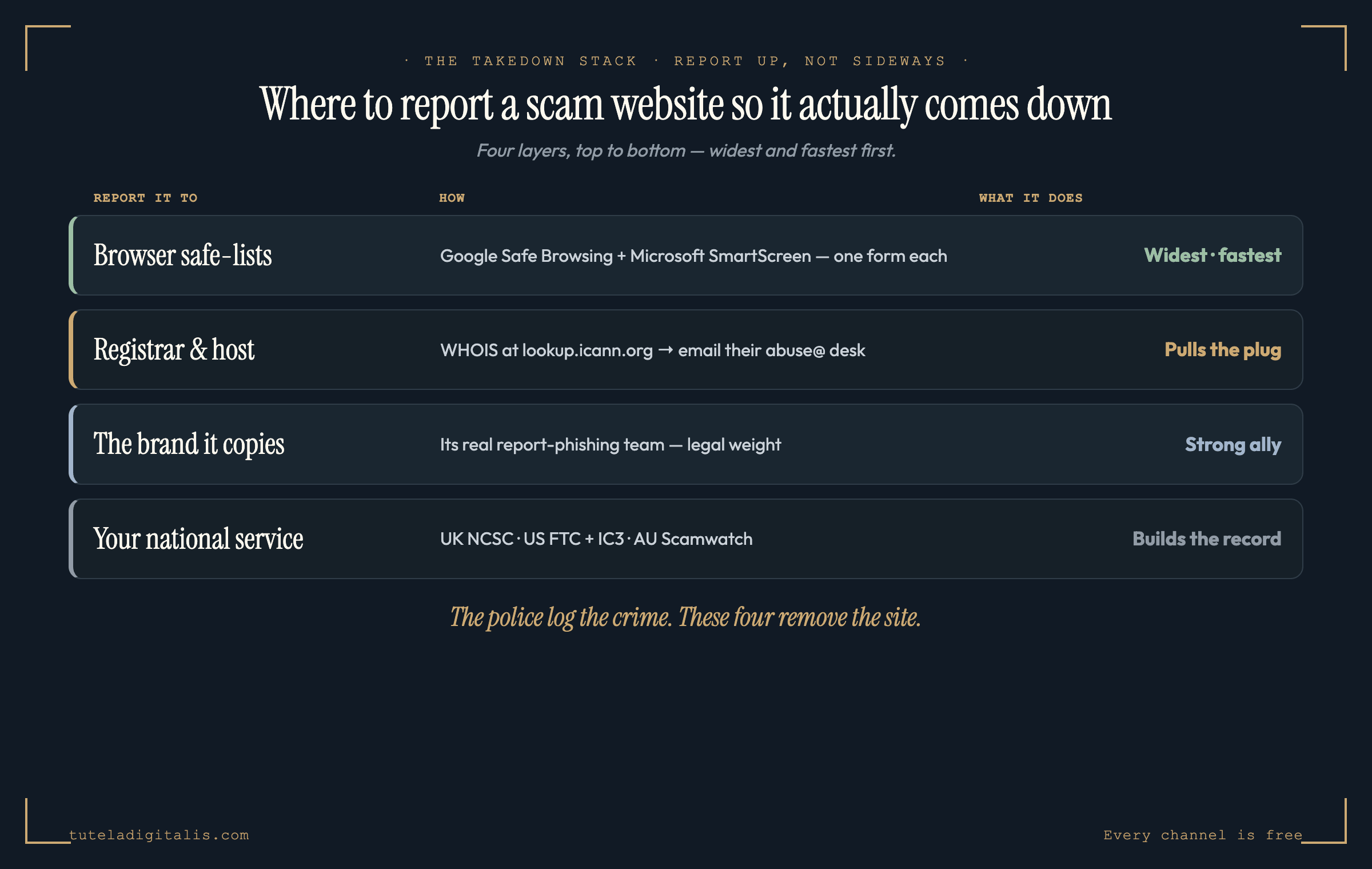
The four places that actually take a site down
Work top to bottom — the order is deliberate, ranked by how many people each step protects and how fast.
1. The browser safe-lists, biggest blast radius, do this first
This is the single highest-leverage thing you can do, and most people skip it. Modern browsers check the sites you visit against constantly-updated lists of known-malicious pages, and when there's a match they throw up a full-screen red warning instead of loading the page. Google Safe Browsing powers that warning in Chrome, Safari, and Firefox; Microsoft Defender SmartScreen powers it in Edge and across Windows. Get a scam URL onto those lists and you've effectively warned most of the internet at once — long before the domain itself is pulled.
2. The registrar and host, who can pull the plug
Every domain is sold by a registrar and served by a hosting provider, and both are required to publish an abuse contact and to act on credible reports. They are the only parties who can take the actual domain or server offline. To find them, run a free WHOIS lookup on ICANN's official tool, lookup.icann.org — it names the registrar and shows its abuse email.
Send that abuse desk a short, factual message: the exact URL, one sentence that it's a phishing or scam site impersonating (whoever it copies), and a screenshot if you have one. Keep it calm and specific — abuse teams act on clear evidence, not outrage. If a registrar ignores a clear-cut phishing report, you can escalate through ICANN's complaint system, which holds registrars to their abuse obligations.
3. The brand it's impersonating
Most scam sites pretend to be someone — a bank, a delivery company, a tax authority, a familiar retailer. That impersonated brand is one of your strongest allies, because large organisations run dedicated takedown teams precisely to kill sites that abuse their name, and a complaint from the brand itself carries legal weight a member of the public's doesn't. Find the company's real "report phishing" or "report fraud" address on its genuine website (navigate there yourself — don't use any link from the scam) and send them the URL. You're handing a motivated, well-resourced party exactly what it needs to act.
4. Your national reporting service
Finally, file it with the official service where you are. This is the step that builds the record, feeds national blocklists, and — in some countries — triggers a government takedown capability of its own.
For the full country-by-country list of official reporting channels, see our where-to-report directory. And one community channel worth knowing: if the scam reached you by email, forward the message to the Anti-Phishing Working Group at reportphishing@apwg.org — its feed of malicious URLs is shared with registrars, hosts, and the blocklists themselves.
What to realistically expect
Be honest with yourself about the outcome so you're not discouraged into doing nothing. The browser warning is usually the fastest win — a confirmed-malicious site can be carrying a red interstitial within hours, which is often more valuable than removal because it protects visitors immediately. Full takedown depends on the registrar and host; the responsible ones move quickly, while a registrar a scammer chose because it's slow can drag. And scam operations do resurrect — a killed site reappears on a new domain. None of that makes reporting pointless. Every site you get flagged or pulled costs the operation money and protects the people who would have landed on it next. Reporting to several layers at once is what tilts the odds.
Not sure if a site is a scam before you report it? Let's check it together.
Paste the link or the message that led you to it. A real expert reviews every case and replies within 24 hours. Free, confidential, no pressure.
Common questions about reporting a scam website
How do I report a scam website?
Report it in four places, not one. First and fastest, flag it to the browser safe-lists: Google Safe Browsing (at safebrowsing.google.com/safebrowsing/report_phish) and Microsoft (microsoft.com/en-us/wdsi/support/report-unsafe-site-guest). That gets a warning shown in Chrome, Safari, Firefox, and Edge — protecting everyone, fast, even before the site comes down. Second, find the site's registrar and hosting company with a WHOIS lookup (lookup.icann.org) and email their abuse desk — they are the only parties who can pull the domain. Third, tell the real brand it's impersonating; banks and couriers run takedown teams. Fourth, report it to your national service (the NCSC in the UK, the FTC and IC3 in the US, Scamwatch in Australia). Every one of these is free.
How do I get a fake website taken down?
A site actually comes down at its infrastructure, not at the complaint desk. The two parties with the power to remove it are the domain registrar (the company the scammer bought the name from) and the hosting provider (the company whose servers it runs on). Look both up with a free WHOIS query at lookup.icann.org, then email the abuse address each one publishes (usually abuse@theircompany.com) with the exact URL and a short note that it's a phishing or scam site. If a registrar ignores a clear abuse report, you can escalate to ICANN's complaint system. In parallel, reporting to the browser safe-lists means the site is flagged with a red warning page for most of the world even while the takedown is still in motion.
Where do I report a scam website in the UK, US, or Australia?
In the UK, the National Cyber Security Centre runs a free reporting form at ncsc.gov.uk/section/about-this-website/report-scam-website; it investigates reported sites and shares them with law enforcement. In the US, there is no single government 'takedown' service — you report the fraud to the FTC at reportfraud.ftc.gov and, if you lost money, to the FBI's IC3 at ic3.gov, and you get the site removed through the browser safe-lists and the registrar/host. In Australia, report it to Scamwatch (scamwatch.gov.au) and, for a crime, ReportCyber at cyber.gov.au. Wherever you are, the browser-safelist and registrar steps work the same — they're not country-specific.
How long does it take to remove a scam website?
It varies from a few hours to a few weeks. The browser warning is usually the fastest result — once Google Safe Browsing or Microsoft SmartScreen confirms a site is malicious, the red interstitial can appear within hours, which protects visitors even before the site itself is gone. The full takedown depends on how responsive the registrar and host are; reputable ones act quickly on a clear phishing report, while a registrar chosen specifically because it's slow to respond can drag. Reporting to several layers at once is what compresses the timeline.
Can I report a scam website anonymously?
Largely, yes. The Google Safe Browsing and Microsoft report forms don't require you to identify yourself, and the UK NCSC form lets you report a URL without giving personal details. Abuse emails to a registrar or host come from your email address, but you don't need to be a customer or a victim to send one — you're just flagging a malicious URL. You never have to engage the scammers or the site itself to report it, and you shouldn't.
How do I report a suspicious website if I'm not certain it's a scam?
You don't need to be certain, and waiting until you are is the common mistake. The browser safe-lists exist precisely to receive reports from people who are unsure: Google Safe Browsing and Microsoft SmartScreen both take a plain report of a suspicious website and do the assessment themselves, using signals you cannot see from the outside. You are not accusing anyone by filing one — you are handing over a URL for review. So the honest sequence is: report a website you find suspicious to the safe-lists first, because that is the cheapest and fastest action and it protects other people within hours if it is confirmed. Only escalate to the registrar and host, which is the route that actually gets a site shut down, once you have concrete evidence of fraud — a payment taken, credentials harvested, a brand impersonated. What you should not do is report frivolously or in bulk; a report you cannot support with anything is noise, and noise is what makes these channels slower for everyone.
Should I pay a 'website takedown service' that contacts me?
No. Every channel that actually removes a scam site — the browser safe-lists, the registrar, the host, the national reporting services — is free. A company that contacts you out of the blue offering to 'take down' a site that scammed you, for a fee, is running the same playbook as a recovery scam: it targets people who just lost money and are angry enough to pay to hit back. Report the site yourself through the free channels. If you were also scammed out of money, see our guide on recovery scams before you pay anyone who promises to fix it.
Sources & further reading
The reporting channels in this piece are linked to their official pages. Click any to verify.