The "Tangerine scam" is impersonation, not a breach of the bank. A text or email that looks like Tangerine warns of "unusual activity" and links you to "verify your account" — the link opens a fake Tangerine login page that captures your Client Number, password, security questions and one-time passcode (OTP). With those, the fraudster logs in and empties the account (an account takeover). Tangerine's own security pages describe exactly this. The one rule that defeats it: Tangerine never texts or emails you a link to log in, and never asks for your Client Number, password, PIN, security questions or OTP. Below is a recreated example, then a beat-by-beat decode.
If you bank with Tangerine, look at the message below before you ever tap a "verify your account" link. The scam doesn't break Tangerine's security — it borrows Tangerine's voice and your own instinct to protect your money.
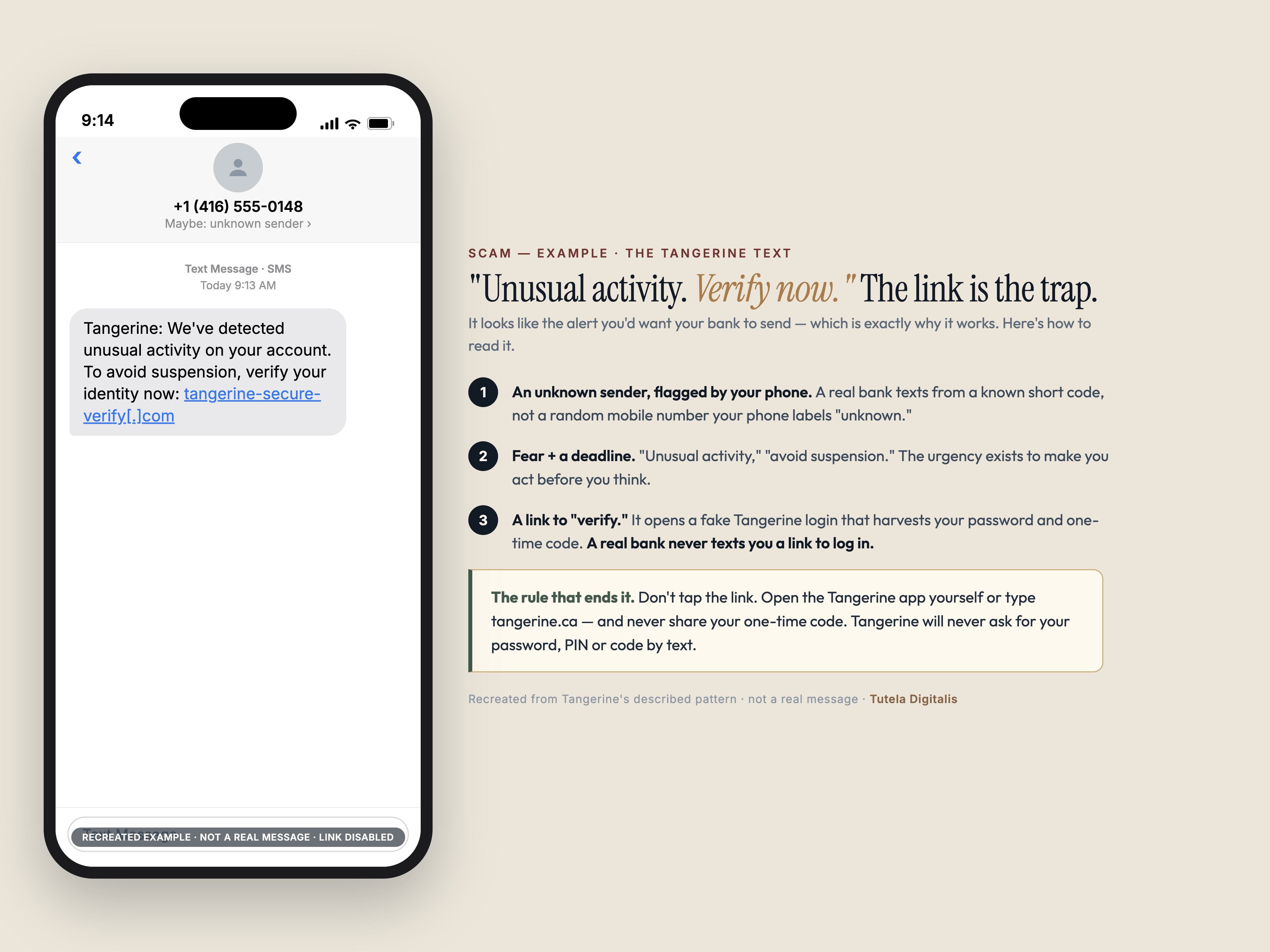
Was Tangerine "hacked," or is your account "compromised"? No: it's a fake text wearing Tangerine's name
The searches spiking right now — tangerine fraud, tangerine spam, tangerine scam, "is my Tangerine account compromised" — are mostly people who just got one of these texts and want to know whether the bank itself was breached. The honest answer: Tangerine's systems weren't hacked. What you received is a smishing text — spam blasted to huge lists of phone numbers, most of whom don't even bank with Tangerine — dressed up as a security alert so you'll click. Getting one doesn't mean your account is compromised or that anyone has your details; it means your number was on a list. Your account only becomes compromised if you act on the message — tap the link and enter your Client Number, password or one-time code on the fake page. Don't, and there is nothing for the scammer to use; just delete it.
If you did tap and enter something, treat the account as compromised and move fast — the steps are below. This is the mirror of the Interac e-Transfer interception scam: there, a stranger guesses or reads the secret that releases your money; here, you're talked into typing it in yourself. Same lesson — a real bank never makes you log in through a link it texted you.
Why a "security alert" is the perfect disguise
A fraud warning is the one message you're primed to act on fast — which is exactly why scammers wear it. The text mimics the alert you'd want, attaches a deadline ("verify now to avoid suspension"), and gives you a single, helpful-looking button. Tangerine, the Canadian Anti-Fraud Centre and Canadian media have all flagged bank-impersonation as one of the fastest-growing fraud types; the CAFC reported Canadians lost more than $704 million to fraud in 2025 — a record — and estimates only 5–10% of fraud is ever reported, so the real total is far higher. Tangerine itself lists account takeovers and impersonation among the threats to watch.
Anatomy of the scam, decoded
The Tangerine smishing scam is a short sequence built on fear and a helpful-looking link. Naming each move is what makes it visible.
What to do
How to report Tangerine fraud or phishing: the four channels, in order
People arrive at this page from two different places. Some are holding a text they haven't tapped and want to know where to send it. Others have already entered something and need the account locked. The channels are the same; the order is not, and getting the order wrong is what costs money. Containment first, reporting second — an email to a phishing inbox does not freeze anything.
One thing worth saying plainly, because it is the question underneath most searches for tangerine fraud: reporting and reimbursement are not the same process, and doing the first well does not improve the second. Canada has no law compelling a refund. What moves a bank is documentation — timestamps, screenshots, the reference number from that first phone call — which is why the call comes before the forwarding.
Got a "Tangerine" text you're not sure about? Send it to us first.
Paste the message or the link. A real expert reviews every case and replies within 24 hours. Free, confidential, no pressure — before you tap anything.
Common questions about the Tangerine scam
What is the Tangerine scam?
It's an impersonation scam, not a breach of Tangerine itself. You receive a text or email that looks like it's from Tangerine, warning of "unusual activity" or that your account is locked, with a link to "verify your account." The link goes to a fake Tangerine login page that captures your Client Number, password, security questions and one-time passcode (OTP). With those, the fraudster logs in and drains the account — what Tangerine calls an account takeover. Tangerine's own security pages describe exactly this pattern. The single rule that defeats it: Tangerine never sends a text or email asking you to log in through a link, or asking for your Client Number, password, PIN, security questions or OTP.
How do I tell a real Tangerine message from a fake one?
Read what it asks you to do, not how official it looks. Tangerine states it will never email or text you asking for your Client Number, Account Number, security questions, PIN or one-time passcode — and it won't send you a link to log in. A genuine alert tells you to open the Tangerine app yourself; a scam gives you a link or a number to call. When in doubt, don't tap anything: open the official app or type tangerine.ca yourself, or call the number on the back of your card. You can forward a suspicious email to phishing@tangerine.ca to have it checked.
Will Tangerine refund money lost to the scam?
Be realistic — Canada has no law that forces a refund, so it's case-by-case and at the bank's discretion. If the transactions were unauthorised (a fraudster used your stolen credentials), you may be covered under Interac's or the card network's zero-liability policy — but it is not automatic, and banks can deny it if they decide you "contributed" by sharing a password or one-time passcode. That's the cruel catch with phishing: its whole purpose is to get you to hand over that code, which the bank may then treat as your fault. Money you were tricked into sending yourself by Interac e-Transfer is the hardest of all to recover; CBC's Go Public has documented many Canadians refused reimbursement. Report fast and see our Canada guide for the full process.
I clicked the link / entered my details — what do I do now?
Act immediately. Call Tangerine to report it and lock the account (Tangerine lists 1-888-826-4374 for suspicious activity and 1-888-723-3304 for phishing), and forward the message to phishing@tangerine.ca. Then change your Tangerine login and any password you reused, enable 2-Step Authentication, place a fraud alert with Equifax and TransUnion, and check your other accounts for unauthorised activity. Report it to the Canadian Anti-Fraud Centre (1-888-495-8501) and the police. Be wary of anyone who then calls offering to "recover" your money or claiming to be the bank's fraud department — that is the second scam.
Was Tangerine hacked, or is my account compromised?
No — receiving a scam text doesn't mean Tangerine was hacked or that your account is compromised. These "unusual activity" messages are smishing: spam blasted to large lists of phone numbers, most of whom aren't even Tangerine customers. Your account is only at risk if you act on the text — tap the link and enter your Client Number, password, security answers or one-time code on the fake login page. If you didn't enter anything, there's nothing for the scammer to use; just delete it. If you did, treat the account as compromised: call Tangerine at 1-888-826-4374, change your password and any you reused, and turn on 2-Step Authentication.
How do I report Tangerine fraud?
Go through Tangerine directly, then the national channels. Tangerine publishes 1-888-826-4374 to report suspicious activity or a compromised account, and 1-888-723-3304 for phishing; a suspicious email can be forwarded to phishing@tangerine.ca. Call first if money has moved or you entered credentials — the phone line locks the account, an email does not. Then report to the Canadian Anti-Fraud Centre on 1-888-495-8501 and file at reportcyberandfraud.canada.ca, the joint RCMP/CAFC system. Reporting to the CAFC does not recover your money; it feeds the intelligence picture and supports takedowns. Getting money back is a separate argument with the bank, and if that fails you escalate to OBSI.
How do I report a Tangerine phishing email or text?
Forward the email to phishing@tangerine.ca — that is Tangerine's published address for having a suspicious message checked. For a text, forward it to 7726 (SPAM), the free short code Canadian carriers use to collect smishing, and delete it. Don't tap the link first to "see where it goes": loading the page can confirm your number is live, and on a fake login page the risk is that you type something. If you already entered your Client Number, password, security answers or a one-time code, stop reporting and start containing — call 1-888-826-4374 immediately, then change any reused password and turn on 2-Step Authentication.
Is this "Tangerine" text just spam, or an actual scam?
It's both — and the distinction doesn't change what you do. The text is spam in that it's sent in bulk to numbers at random, but its purpose is fraud: to get you onto a fake Tangerine login page and capture your credentials. Tangerine never texts or emails you a link to log in, and never asks for your Client Number, password, PIN, security questions or one-time code — so any message that does is a scam, however official it looks. Don't tap the link: open the Tangerine app yourself or type tangerine.ca, and forward the message to phishing@tangerine.ca.
Sources & further reading
Claims here follow Tangerine's own security pages, the Canadian Anti-Fraud Centre, and CBC's Go Public reporting on Canadian bank-fraud reimbursement. The recreated message is built from Tangerine's described pattern, not a captured real text.