A tech support scam is when someone posing as Microsoft, Apple, your bank, or a government agency convinces you that your device or money is under attack, then walks you through "protecting" it by handing it to them. The FBI's IC3 logged $1.46 billion in tech-support losses in 2024 — the third-costliest crime category it tracks. The most damaging form, the FBI's "Phantom Hacker," chains three fake callers together: tech support, then your bank, then a government official, each appearing to confirm the last, until an entire savings account is gone. Most victims are over sixty. Remember two facts and you are almost immune: no real company monitors your personal computer and cold-calls you about it, and no real bank or agency ever asks you to move your money to a "safe account."
Read the image explanation
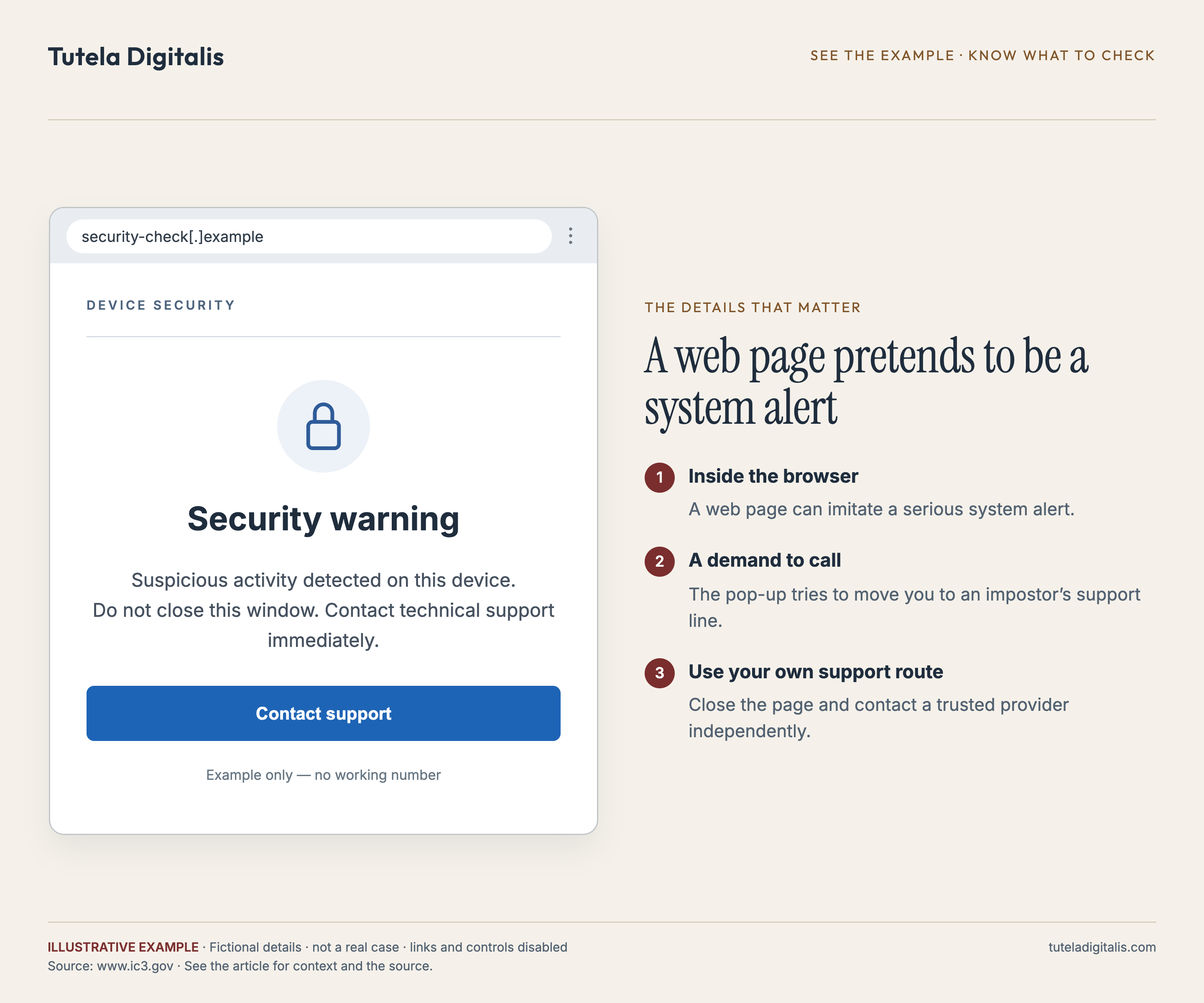
Illustrative example: Security warning Suspicious activity detected on this device. Do not close this window. Contact technical support immediately. Contact support Example only — no working number
- Inside the browser. A web page can imitate a serious system alert.
- A demand to call. The pop-up tries to move you to an impostor’s support line.
- Use your own support route. Close the page and contact a trusted provider independently.
"These scammers are cold and calculated. They are targeting older members of our community who are particularly mindful of potential risks to their nest eggs. The criminals are using the victims' own attentiveness against them."
— Robert K. Tripp, Special Agent in Charge, FBI San Francisco, on the FBI's 2023 "Phantom Hacker" public warning. The FBI's IC3 reported that in the first half of 2023 alone, tech-support scams generated more than 19,000 complaints and over $542 million in losses — and that nearly half the victims, accounting for 66% of the losses, were over the age of 60.
I think the tech support scam is the most underestimated fraud in America, and I think it is underestimated for a stupid reason: the name sounds small. "Tech support scam" sounds like a nuisance pop-up, the kind of thing a tech-literate person scrolls past. It is not. It is the entry point to a machine that took $1.46 billion in a single year, that the FBI ranks third by losses out of every internet-crime category it tracks, and that is engineered specifically to convert an elderly person's lifetime of savings into cryptocurrency, gift cards, or a duffel bag of cash handed to a courier on a doorstep.
I am writing this in first person because I want my name attached to a few sentences that the companies being impersonated rarely say this plainly. The infrastructure that makes this scam work — the fake full-screen pop-ups, the remote-access tools that install in two clicks with no friction, the call centers that operate at industrial scale — is well understood by the people who could make it harder. The scam has been running, in recognizable form, for over a decade. The FBI named the "Phantom Hacker" variant in 2023. And the median victim is still a retiree, the median outcome is still a drained account, and the standard advice still arrives after the money is gone. So let me put the defense up front, in the order that matters.
What a tech support scam actually is
Strip away the cover stories and every tech support scam is the same three-move sequence: manufacture fear about your money or your machine, gain access or control, then extract the money. Here is what the moves look like in the wild.
The Phantom Hacker: three callers, one bank account
The FBI gave the worst version of this scam a name in 2023 because it had become distinct enough to warrant one. The Phantom Hacker is not one impostor — it is three, in sequence, each engineered to dissolve the doubt the last one might have raised. It is the reason people who would hang up on a single suspicious call still lose everything.
How the cash actually leaves
Once a victim is convinced, the scammer needs a payment rail that cannot be reversed. Every method below is chosen for the same reason: by the time anyone understands what happened, the money is unrecoverable. This is also where the tech support scam feeds directly into the other elder-fraud rails I have written about.
Why it works on the people it works on
There is a lazy assumption that tech support scams catch only the naive or the cognitively declining. The data says otherwise, and so does the structure of the scam. It is built to defeat exactly the people who are paying attention.
Consider what the scam actually demands of a victim: that they take a threat to their savings seriously, act quickly to protect their money, follow the instructions of people who present as their bank and their government, and keep the matter confidential while it is "investigated." Every one of those is a responsible instinct. A careless person ignores the call. A careful person engages — and the script is written for the careful person. That is what FBI San Francisco's Robert K. Tripp meant by "using the victims' own attentiveness against them." The targeting of older adults is not really about gullibility; it is about who holds decades of savings in one place and who was raised to treat a call from the bank as something you cooperate with.
What the institutions have, and haven't, done
I want to be fair about this: there has been real enforcement, and it deserves to be named alongside the gaps. But the honest read is that the response is reactive, slow, and aimed downstream of where the harm is manufactured.
The 2025 numbers: the call is now a two-billion-dollar business
The FBI's 2025 Internet Crime Report, published in April 2026, is the first full-year picture since this page was written, and every number in it moved in the same direction. Complaints to IC3 passed one million for the first time, 1,008,597, with $20.877 billion in reported losses, up 26% on 2024. Tech support fraud was the third costliest category again, behind investment fraud and business email compromise, and it grew from $1.46 billion to $2.13 billion across 47,794 complaints. Government impersonation, the second voice in the Phantom Hacker script, added $798 million across 32,424 complaints.
The 8-step playbook: what to do
This is the sequence I would follow if the call were happening to me right now, or to a parent of mine. None of it is technical. All of it is what the gap between the scam's scale and the institutional response has left on your shoulders.
So, what should you actually believe about tech support scams?
Believe the scale. $1.46 billion in a single year, third out of every internet-crime category the FBI tracks, and that is only the share that reached a complaint form — shame keeps most elderly victims from ever reporting, so the real number is higher.
Believe that it is built for careful people, not careless ones. The pop-up, the bank caller, the government caller — the whole architecture is designed to convert your sense of responsibility into the lever that empties your account. Knowing that is most of your defense.
Believe that the institutions are moving, and that they are moving downstream of the harm. The FBI is arresting call-center operators. The FTC has a new rule and is writing settlements. And the median victim is still over sixty, the standard advice still arrives after the wire clears, and the two-click remote-access install still ships without the friction that would break the con.
If you take one rule from this whole piece, take this: the words "move your money to a safe account" are the scam, every time, no matter who is saying them — Microsoft, your bank, the Federal Reserve, the FBI. A real institution protects the account you already have. It never asks you to empty it. Hang up, and call back on a number you found yourself.
On a call right now telling you to move your money? Hang up first, then talk to us.
Tell us what you were told, what you installed, and where any money went. A real expert reviews every case and replies within 24 hours. Free, confidential, no pressure.
Common questions about tech support scams
Will Microsoft, Apple, or my bank ever call me about a virus or a hacked account?
No. This is the single most useful fact in this entire piece. Microsoft does not monitor your personal computer for infections and will never cold-call you, text you, or pop up a full-screen warning with a phone number telling you to call. Apple does not do it either. Your bank's fraud team may call you about a specific suspicious transaction, but they will never ask you to install software, read out a code, grant remote access to your computer, or move your money to a 'safe account.' Any unsolicited contact that claims your device or account is under attack and gives you a number to call is a scam. The number connects you to the scammer, not to the company being impersonated.
I gave a scammer remote access to my computer — what do I do now?
Act in this order. Disconnect the computer from the internet (unplug the ethernet cable or turn off Wi-Fi). Power the machine off so any remote session is severed. From a different, clean device — a phone, a tablet, another computer — change the passwords on your email and banking accounts, starting with email, because email is the reset key to everything else. Turn on two-factor authentication. Call your bank's fraud line using the number on the back of your card and tell them you granted remote access; ask them to watch for unauthorized transfers. Uninstall any remote-access tool the scammer had you install (common ones are AnyDesk, TeamViewer, and similar). If you are not confident the machine is clean, have it professionally checked before you log into anything sensitive on it again.
What is the 'Phantom Hacker' scam?
The Phantom Hacker is the FBI's name for the most damaging form of tech support scam, and it works in three chained phases. First, a fake tech-support agent contacts you (pop-up, call, email), gets remote access, and tells you your accounts are at risk — which conveniently makes you open those accounts so the scammer can see which one holds the most money. Second, a fake employee from your bank or brokerage calls to 'confirm' the breach and says foreign hackers have your money. Third, a fake US government official — often claiming to be from the Federal Reserve or the FBI — instructs you to move your savings to a 'safe' or 'alias' government account, which is controlled by the scammer. Because each caller appears to corroborate the last, victims who would never fall for a single call are walked, step by step, into emptying entire retirement and savings accounts. The FBI has publicly put Phantom Hacker losses at over $1 billion, the majority from victims over 60.
Can I get my money back after a tech support scam?
It depends entirely on the payment method and how fast you move. If money left by wire transfer, call your bank's fraud line within hours — domestic wires can sometimes be recalled before they settle, and the FBI's Financial Fraud Kill Chain can occasionally freeze funds when IC3 is notified fast enough. If you paid by credit or debit card, you have chargeback and Regulation E protections. If you paid in cryptocurrency through a Bitcoin ATM, or handed cash or gold to a courier, or bought gift cards, recovery is far harder and usually fails — those rails are chosen by scammers precisely because they are irreversible. In every case, file with the FBI's IC3 and the FTC immediately. Treat any 'recovery service' that contacts you afterward as a second scam.
Why do tech support scammers target older people?
Two reasons, and neither is the condescending one people assume. First, older adults are more likely to hold the assets the scam is built to drain — paid-off homes, retirement accounts, decades of savings sitting in one place. Second, and more cynically, the scam weaponizes responsibility. As FBI San Francisco Special Agent in Charge Robert K. Tripp put it, the criminals 'are using the victims' own attentiveness against them.' Someone who carefully watches their nest egg is exactly the person who will act fast when told that nest egg is under attack. The FBI's data bears the targeting out: in the first half of 2023, victims over 60 accounted for 66% of all tech-support scam losses.
Is it safe to call the number in a pop-up virus warning?
No. The phone number in a pop-up warning is the scam. Legitimate security software does not put a phone number on an alarming full-screen warning and tell you to call it. The pop-up is designed to frighten you into dialing a number that connects you directly to a scammer's call center, where a scripted 'technician' will ask for remote access to your computer. If a pop-up has frozen your browser, do not call anything — close the browser (on Windows, use Task Manager to force-quit it; on a Mac, Force Quit), or restart the computer. The warning disappears because it was never real to begin with. If you are genuinely worried about your device, contact the manufacturer or your own trusted technician using a number you look up yourself.
Sources & further reading
Every figure in this piece is drawn from these authorities. Click any of them to verify.