CANADA · VERIFY THE TOLL MESSAGE
By Peter · 11 October 2026 · 9 min read
407 ETR scam text or email? A real toll does not verify the message.
407 ETR sends genuine payment reminders, but scammers imitate its texts, emails and payment pages. A familiar road, small balance or matching sender format does not authenticate the message. Do not use a suspicious link. Open 407etr.com yourself or use the official app to check My Account. If you entered card details or paid, contact your financial institution promptly through a trusted route.
“Log in to be sure.”
The easy rule would be that every 407 text is fake. The operator's current guidance makes that rule wrong. The useful distinction is between a possible real bill and an unverified route to pay it. Both can exist at the same time.
This guide covers impersonation of Ontario's 407 ETR. It does not treat a separate parking-ticket or ServiceOntario message as a 407 notice. For a different sender, use our Canadian scam text checker and verify that organization's own contact rules.
Does 407 ETR actually text or email customers?
Yes. The operator describes legitimate texts, emails, automated reminder calls and letters. Its 5 March 2026 guidance confirms that reminder texts use a six-digit short code and the customer's first name. These are published communication practices, not a way to authenticate a particular message.
A text from a six-digit short code, with your name
Published practice: 407 ETR describes this as its payment-reminder format.
What it cannot prove: A matching format or correct name is a clue, not authentication. Check the balance independently.
An email with a familiar display name
Published practice: The operator lists info@407etr.com, communications@407etr.com and notifications@407etr.com as sending addresses.
What it cannot prove: A display name can say anything. Examine the full address, but still verify the requested action outside the message.
A link that appears to say 407etr.com
Published practice: 407 ETR says its communications link only to its own domain.
What it cannot prove: Displayed link text can hide a different destination. Do not open a suspicious link to test it.
An overdue-balance or collections story
Published practice: Real reminders and third-party collections calls exist.
What it cannot prove: That possibility does not validate an urgent demand, an unverified payment page or the person contacting you.
These checks come from the current 407 ETR fraud-awareness page. The operator says it does not request passwords, PINs or card details through its communications, and does not pressure customers with threatening language. Entering card details after independently opening a genuine payment service is a different situation from handing them to an unsolicited contact or unverified page.
How do you check the toll without trusting the message?
Start outside the message. Open the official app you already use, or enter 407etr.com into your browser yourself. From there, open My Account and check your balance and billing history. If something remains unclear, use contact details on the official site or a known bill to ask about it.
Do not call a number supplied only by the questionable message or use its payment button. A genuine balance in your account can confirm that money is owed; it does not confirm who sent an email or where its link leads. If payment is due, make it through the independently opened service.
The Get Cyber Safe phishing fact sheet distinguishes a hyperlink's visible wording from its actual destination. On a computer, hovering can reveal a different target without opening it. You do not need to investigate the target yourself: independent account access avoids the suspicious route entirely.
407etr.com.example[.]invalid is not 407etr.com. A padlock or copied logo also does not establish who operates the page.What does a reported fake 407 ETR bill look like?
A firsthand post by The IT Nerd dated 9 February 2026 shows an email claiming a $9.95 CAD balance. Its artifact is dated 5 February. The author describes a non-provider address and a displayed official link whose target led elsewhere, then reports finding a card-harvesting page. Tutela did not open that target or independently authenticate the full personal account.
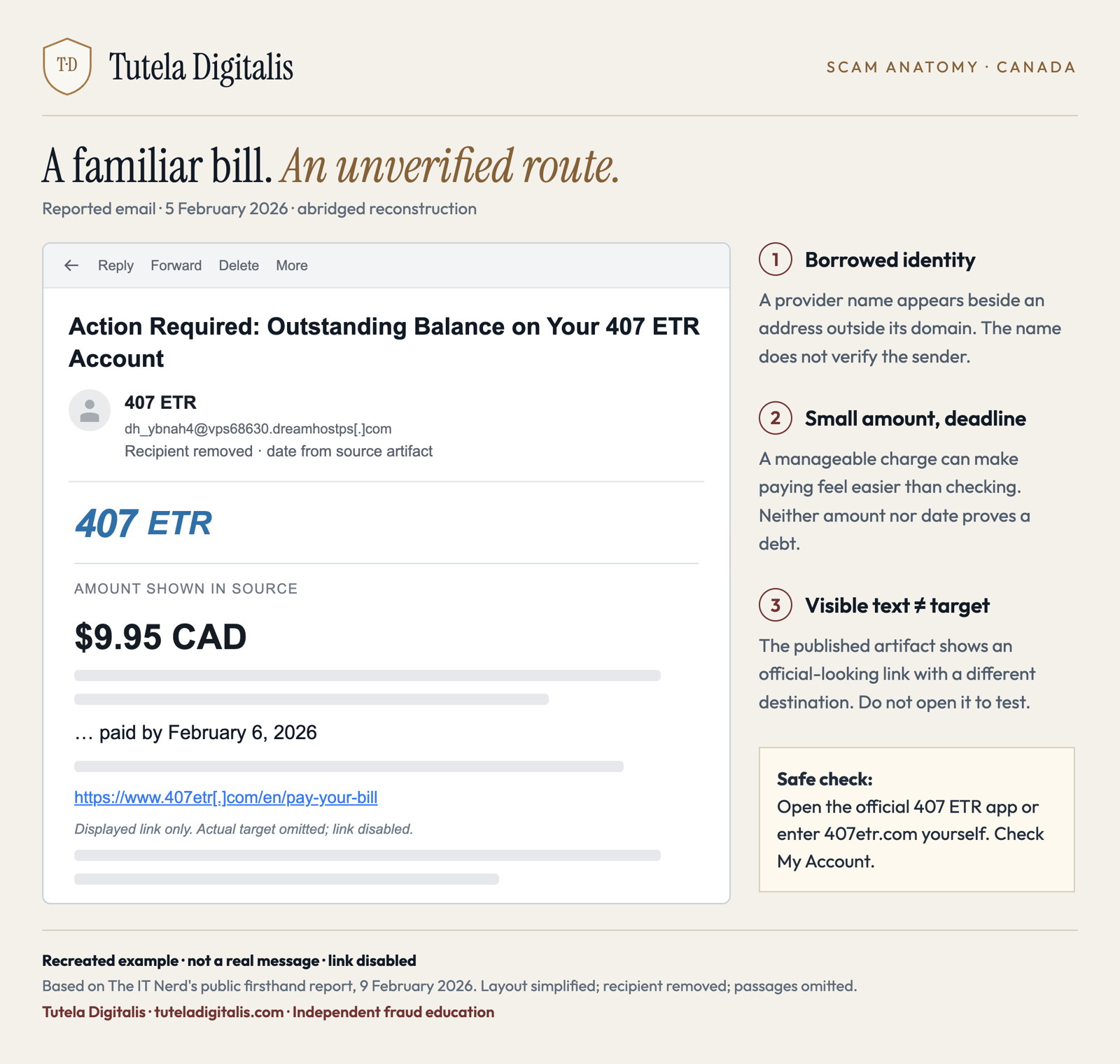
Read the image and its warning signs
The example claims an outstanding balance and presents a small amount with a payment deadline. It shows a provider name beside an address outside the provider's domain. The displayed payment address looks official, but the source's separate link inspection shows an off-site destination.
The reconstruction does not include the live target. It preserves recognition cues from one reported email. Different amounts, wording or dates do not authenticate another request.
A small amount is not inherently proof of fraud, and a message arriving after a trip does not establish how the sender obtained your information. The example illustrates a documented impersonation pattern; it cannot identify the people responsible or prove a connection to a particular data breach.
Why can a fake bill feel like an ordinary task?
It offers a short path from uncertainty to relief: settle a modest charge and avoid trouble. The following is Tutela's analysis of the reported email and the operator's warnings. Each persuasive move has a check that breaks the sequence.
STEP 1
The road supplies a plausible memory
A message names a toll road you may actually have used. A real journey makes the claimed bill feel possible.
Why it can persuade: Recognition substitutes for checking: you know the road, so the demand seems less foreign.
Your check: Treat your travel history and the message's authenticity as separate questions. Check your real account.
STEP 2
A manageable amount lowers the effort threshold
The reported email uses a small balance rather than a dramatic loss. Paying can look easier than investigating.
Why it can persuade: Friction avoidance: a modest charge can feel like a quick administrative task, while the card data is the more valuable target.
Your check: Verify even a small amount. Do not enter financial details merely because the requested payment seems affordable.
STEP 3
The deadline turns checking into delay
The example places a date beside the payment request. Other warnings describe pressure about overdue tolls or penalties.
Why it can persuade: Loss aversion: avoiding a consequence becomes the reason to skip independent verification.
Your check: Move the task to the official account. A deadline inside a message does not establish that a debt or consequence is real.
STEP 4
The familiar link becomes borrowed proof
A copied bill, logo or displayed official address makes the next payment screen seem part of an established relationship.
Why it can persuade: Authority transfer: recognizable branding is taken as evidence about a destination it does not authenticate.
Your check: Start a new session through the official app or an address you enter yourself. Verify the balance and pay there if appropriate.
What should you do if you clicked, entered details or paid?
Use the action you actually took to decide what needs protecting. More than one branch may apply. Get Cyber Safe's response guidance supports securing affected accounts, contacting a bank after financial details are shared and checking for malware when relevant.
You received it but did not interact
You clicked, but entered nothing
You entered card or account details
You approved a payment or see an unfamiliar transaction
You shared identity documents or extensive personal data
The Financial Consumer Agency of Canada says federally regulated financial institutions must investigate disputed unauthorized transactions and cannot decide liability merely because authentication technology was used. This does not make every payment approved under deception automatically refundable. Tell the institution what happened without changing the facts to fit a label; the applicable protection, agreement and evidence matter.
Where should you send the report?
407 ETR asks customers to send an image of suspicious communications to information@407etr.com. Preserve the sender, original message, visible address, dates and any payment record. Do not email passwords, full card numbers or verification codes.
The national reporting route accepts victims and witnesses at Report Cybercrime and Fraud, or through the CAFC at 1-888-495-8501. If you were a victim, contact local police too. The CAFC collects and shares information; your local police handle investigation. Report financial exposure to the bank separately, rather than waiting for one agency to notify another.
You do not need to resolve every inconsistency in the incoming message. You need a route to the real account that the message did not choose for you.
Questions about 407 ETR scam texts and emails
Does 407 ETR send legitimate text messages?
Yes. Its current fraud-awareness page says payment reminders come from a six-digit short code, include the customer's name and link to its secure payment page. This describes the operator's practice; it does not prove that a matching message is genuine. Independently open 407etr.com or the official app and check My Account before paying.
Can a 407 ETR email be genuine?
Yes. 407 ETR lists info@407etr.com, communications@407etr.com and notifications@407etr.com as sending addresses. Check the full address rather than the display name, and verify the account or payment request independently. A copied logo, your name or an official-looking link is not sufficient proof.
Is the 407 ETR text about an unpaid toll or licence suspension real?
Do not decide from the threat alone. 407 ETR warns about messages using urgent or threatening language and directing people to unfamiliar websites. Avoid the link and check your actual balance through the official app or an independently opened 407etr.com. Real billing and collections issues should be addressed through verified contact, not a payment demand inside a suspicious message.
What if I clicked the 407 scam link but entered nothing?
Close the page and do not return to test it. Check whether you entered any information, downloaded or opened a file, installed an app or granted permissions. A click alone does not establish that your card was used or an account was taken over. Keep software updated and use appropriate security checks if a download or device change occurred. On a work device, contact your IT team.
What if I entered my credit card on a fake 407 page?
Contact the card issuer through its official app or the number on your card promptly, even if no charge is visible. Explain that you entered the details on a suspected phishing page. Ask about blocking or replacing the card and monitoring transactions. Report any password, banking information or verification code you supplied too. Do not assume failing to finish the form kept the information private.
Can I get a fake 407 ETR payment refunded?
Contact the financial institution that handled the payment immediately and ask about the applicable dispute or recovery process. Describe exactly what you did and distinguish a payment you approved under deception from later transactions you did not authorize. Canadian protections and investigation rights depend on the circumstances and institution. A report to 407 ETR, police or the CAFC does not guarantee reimbursement.
Where do I report a 407 ETR scam?
407 ETR asks for suspicious communications, including an image, at information@407etr.com. Canada also accepts victim and witness reports through Report Cybercrime and Fraud or the CAFC at 1-888-495-8501. If you were a victim, report to your local police as well. Contact your bank or card issuer separately if financial details or a payment were involved.
SOURCES · CHECKED 11 OCTOBER 2026
Operator contact rules checked at the current source; its fraud-awareness page does not display an update date. The March 2026 release and February 2026 personal account retain their original dates. This article does not establish the frequency of current attacks or certify an individual message.