Your phone was never touched. Your number was moved.
There is a version of account theft where nothing gets broken into. No password is cracked, no malware is installed, and your handset never leaves your pocket. Someone simply persuades your mobile carrier that they are you, and your number is assigned to a SIM in their phone.
From that second, every code sent to you by text arrives with them. And there are two settings people reach for to prevent it, with confusingly similar names. Only one of them works.
A port-out is your phone number being moved to a different carrier, and a SIM swap is it being moved to a different SIM at the same carrier. In both, the attacker asks the carrier, not your phone, so a SIM PIN does not stop either. The control that works is held at your carrier: AT&T calls it Wireless Account Lock, T-Mobile calls it Account Takeover Protection, and Verizon splits it in two, Number Lock for transfers and SIM Protection for SIM changes. All of them are free, all of them live in the carrier's app or account rather than your phone settings, and each has to be added on the account. Port-out protection is that switch.
Nothing failed. That is the problem
The instinct is to ask what was hacked. The answer is nothing, and holding onto that is what makes the rest of this make sense.
A port-out is not an intrusion. It is a substitution. The attacker does not defeat your bank's security, they satisfy it. Every check still runs, every check still passes, and every check passes for someone else.
Read that column again. At no point does anything read as an error, because nothing is an error. The system was asked whether the person holding the number is the account owner, and the honest answer, by the only definition the system has, is yes.
The two locks
This is where the practical mistake happens, and it is an easy one to make because both controls sound like they protect the same thing.
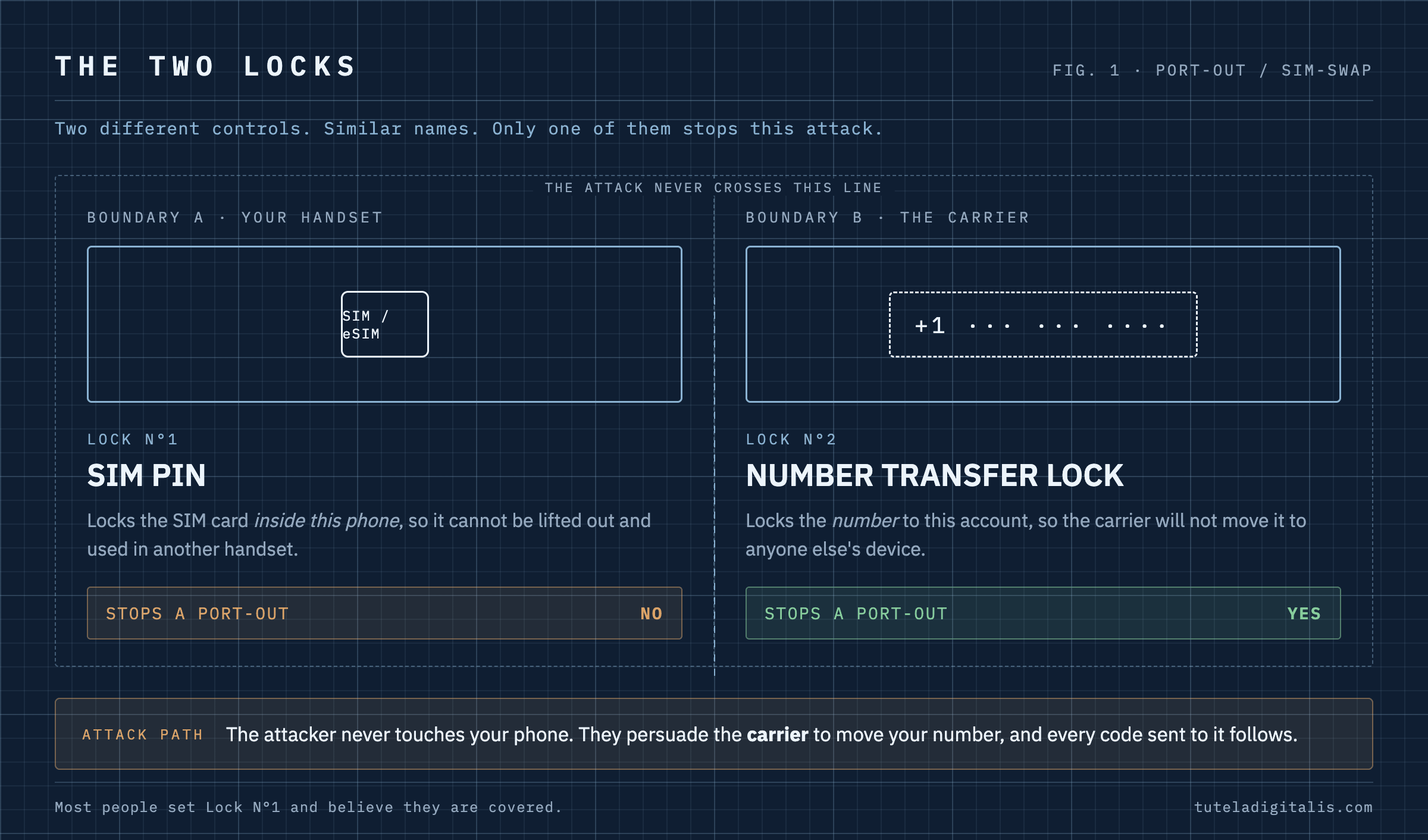
The naming is genuinely part of the problem. Every major carrier is required to offer this kind of protection, but each one calls it something different, so there is no single phrase to search for and no shared vocabulary between the advice you read and the menu you are looking at.
AT&T calls its version Wireless Account Lock, describes it as free, and puts the toggle in the myAT&T app. In AT&T’s own words it “disables several key account changes including billing updates or wireless number transfers” and “prevents anyone from buying a device on the account, for example, or conducting a SIM swap.” On other carriers the equivalent exists under a different name. Look in the carrier’s app for a setting that mentions porting, number transfer or locking the account, and treat anything labelled SIM PIN in your phone’s settings as a different control that will not do this job.
The protection is free, required, and switched off
At its meeting on 15 November 2023, the FCC adopted rules aimed specifically at SIM swap and port-out fraud, requiring wireless providers to use secure methods to authenticate customers before making SIM changes, and to maintain a clear process for reporting and remediating fraud. The FCC set the compliance date as 8 July 2024, or later if approval from the Office of Management and Budget came after that date.
So the controls exist because regulation put them there. What regulation did not do is switch them on. A provider being required to offer secure authentication is not the same as your account having the lock enabled, and the gap between those two things is the entire operating space for this attack.
Knowing your number and controlling it are different situations. If you are unsure which risk you face, our guide to what a scammer can do with your phone number separates the number alone from additional personal details and a completed takeover.
How do you know if someone is trying to port your number?
Watch for three signals. The first one may give you time to stop it.
On Verizon, call *611 from the phone itself, which Verizon says works even if the device has been deactivated, or 1-800-922-0204 from any other phone. On any other carrier, use the number on your bill or in the carrier’s own app.
Should you turn on port-out protection, and how do you turn it off?
Yes, turn it on. It is free. The cost is an extra step whenever you change carrier, SIM or phone, or make some other account changes, and on Verizon a short wait before a SIM change. That step is the point: it has to be you who takes it.
When you do switch, remove the lock shortly before you move. On Verizon and AT&T you do that yourself, in the same app or account; T-Mobile publishes that its protection is removed by the Billing Responsible Party contacting T-Mobile. Verizon says that when a postpaid customer turns off Number Lock there is no 15-minute waiting period, and a prepaid customer waits 15 minutes before a Number Transfer PIN can be generated. SIM Protection is stricter: the restrictions lift 15 minutes after you unlock it, and Verizon says its store and customer service staff cannot turn it off for you. AT&T warns that with Wireless Account Lock on, you may need to be available to unlock the account temporarily when a family member wants a new device on it.
Then switch it back on at the new carrier. If someone claiming to be your carrier, or anyone you were not expecting, asks you to turn it off, treat that request as the attack. It is the subject of the sentence below.
What to do tonight
Two jobs, in this order. First make the number harder to move. Then make it worth less if it moves anyway.
The order matters more than it looks. People protect the bank first because that is where the money is, but the attacker does not need the bank if they hold the email that can reset it.
The sentence the attack needs you to ignore
Once the lock is on, there is exactly one thing standing between it and an attacker: a phone call or a message asking you to turn it off. Which is presumably why AT&T published this line on its own site, in the same announcement:
“Just like you’d never give someone your password or a one-time PIN code over the phone, please know that AT&T will never call or text you and ask you to turn off Wireless Account Lock.”AT&T, 1 JULY 2025
That is a published never-statement, and it is the useful kind. It does not ask you to judge whether a caller sounds convincing. It gives you a rule you can check against a company’s own words: a request to remove the protection is, by the carrier’s own account, never something the carrier makes. We keep a running list of statements like it in the Impersonation Index, because a published never-statement turns an impossible job, spotting a convincing fake, into an easy one.
If your carrier is not AT&T, the same logic holds even where the wording is theirs rather than published. No carrier needs you to disable your own account security in order to help you.
If your number was ported without your permission
Speed is the whole game, and the first move is not the bank. From a device that is not the affected phone, take back the email account, then work outward. Contact the carrier and ask them to reverse the transfer and document it, which the FCC rules require them to have a process for. Then report it, and if accounts were opened or money moved, use IdentityTheft.gov, which produces a personalised recovery plan rather than a generic checklist.
The FCC’s own list for a porting-out scam is four steps: contact your phone company, contact your bank and other financial institutions, file a police report, and place a fraud alert on your credit reports and get copies of them. It also says you can file a complaint with the FCC for free, and identity theft and fraud complaints with the FTC.
The uncomfortable part of this one is also the reassuring part. Nothing about it required you to be careless, because the attack never went through you at all. It went around you, to a company that holds something you have always assumed was yours, and moved it.