FAKE VERIFICATION · CLICKFIX
By Peter · 6 October 2026 · 12 min read
Fake CAPTCHA scam: what to do if you clicked.
A fake CAPTCHA scam disguises a harmful instruction as a check that you are human. In a common ClickFix version, the page asks you to paste and run a command on your computer. A real CAPTCHA does not require that. If you only clicked, close the page and check what else you did. If you ran a command or opened the supplied software, disconnect the device and secure potentially exposed accounts from a different trusted device.
Start with what you actually did
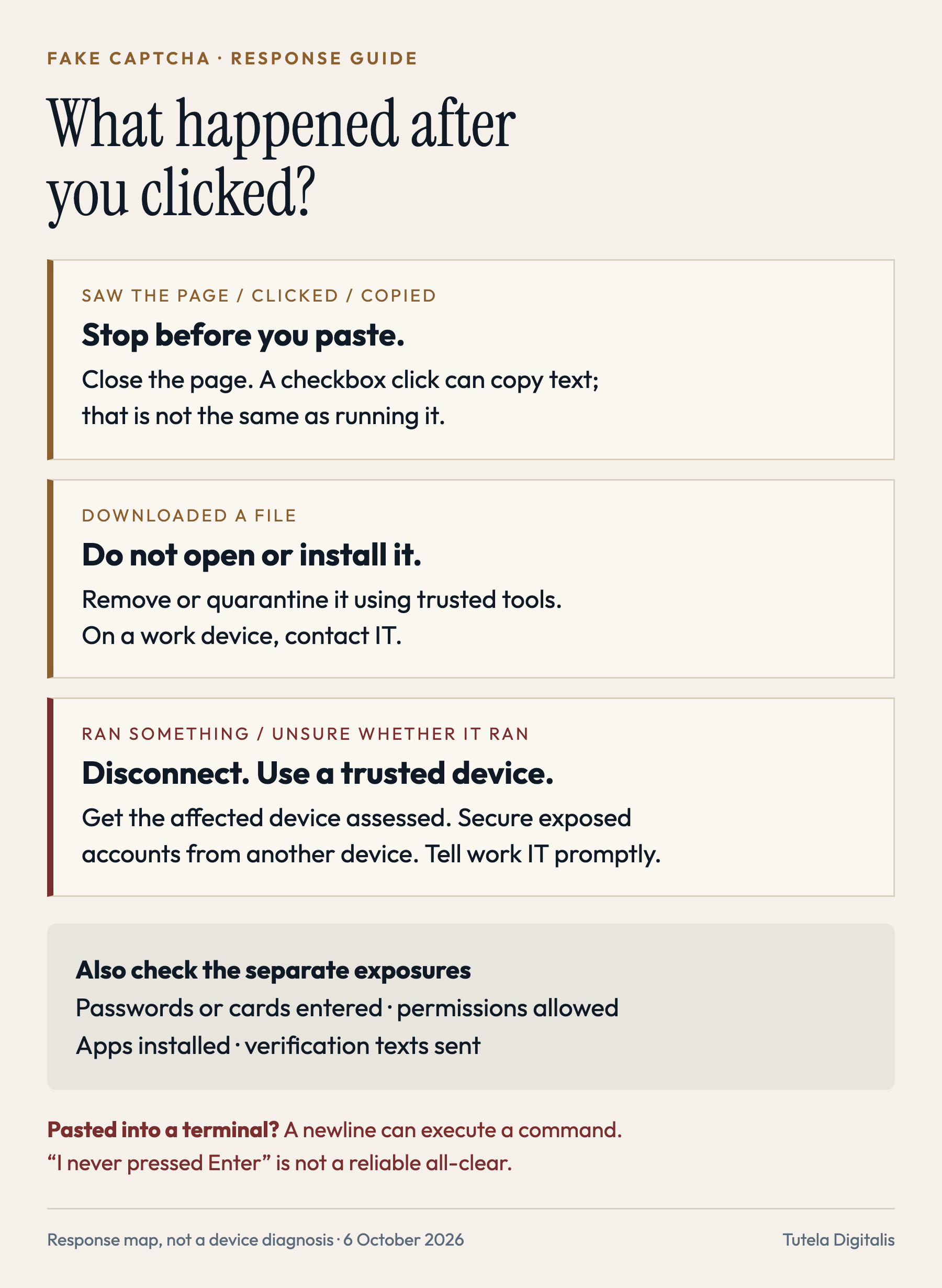
The words “I clicked it” can describe very different events. Work through the actions you remember, including anything that happened after the page changed. A checkbox click, a file download and a command running are not interchangeable evidence.
I only saw the page
Close the tab without following its instructions. If a download appeared, deal with that separately. A page appearing is not, by itself, proof that the ClickFix command executed.
I clicked the checkbox or copied the text
Stop there. Some fake checks copy a command to the clipboard when clicked. Do not paste it into Run, Terminal, PowerShell or any other command window. Close the page, then copy a harmless word from a trusted document to replace the current clipboard contents. That does not undo anything already executed or erase clipboard history.
I opened Windows Run but did not execute anything
Cancel the dialog. If you pasted into Run, do not select OK or press Enter. If you pasted into a terminal or shell, use the potential-execution response: a pasted newline may execute a command without another keypress.
A file downloaded, but I did not open it
Do not open, preview or install it. On a personal device, remove or quarantine it using trusted security tools. On a work device, let IT handle it. Check the browser’s Downloads list without opening the file if you need its name. If it opened automatically, follow the execution steps.
I ran the command, opened an installer, or cannot tell
Treat it as a possible device compromise. Disconnect from networks, stop sensitive use, and follow the steps below. A blank window, an error or no visible result does not settle whether anything ran.
Microsoft’s terminal documentation explains why pasted newlines can execute commands. Behavior depends on the shell, paste method and warning settings; do not test a suspicious command to find out.
These distinctions describe the command-pasting scam, not a guarantee about every malicious page. Keep your browser and operating system updated. Also account for information entered, permissions granted and files opened; those can require action even if you never ran a command.
If you ran a command or installed the software
Act on the possibility of compromise; you do not need to prove which malware was involved before protecting accounts. The FTC’s CAPTCHA warning recommends disconnecting after a suspicious download and using a different device to change passwords. The NCSC’s infected-device guidance explains recovery options. For a managed work or school device, your organization’s incident process takes priority over doing your own cleanup.
- Isolate the device. Disable Wi-Fi and disconnect Ethernet and other network connections. Do not log in to accounts to check whether they still work. Disconnecting limits further communication; it cannot recall data already sent.
- Get the right help. Contact your IT team immediately if work accounts or equipment are involved. For a personal device, use a trusted repair or security provider whose details you find independently. Do not call a number in the warning or buy the scanner it promotes.
- Keep a short incident record. Note the time, the page address if already available, the actions taken and any alert or downloaded filename. A photo taken with another device can preserve what is still on screen. Do not revisit the lure, rerun the command or reconnect just to collect evidence. Ask IT before wiping, resetting or deleting logs on a work device.
- Secure accounts from a different trusted device. Start with your main email account because it can reset other accounts. Change potentially exposed passwords to unique ones, including reused copies. Use each service’s security controls to end unfamiliar or potentially compromised sessions; review recovery details, connected applications and email forwarding rules. Enable strong multi-factor authentication where available.
- Tell your bank promptly if financial access may be exposed. Use the number on your card or the bank’s independently opened app. Explain whether you entered card details, used banking on the affected device or see an unfamiliar transaction. Follow the bank’s protective and dispute procedures. Do not wait for a computer repair before reporting money at risk.
- Remediate before resuming sensitive use. Use the operating system’s official guidance and established security tools, not software advertised by the suspicious page. A technician or IT team may recommend a reset or clean reinstall. Restore cautiously from a known-good backup; do not restore the suspicious installer. Reconnect and resume use according to that recovery plan.
Google’s compromised-account checklist covers security events, recovery settings and unwanted changes. Its device and session review explains how to sign out sessions. Apply the equivalent controls to other affected services. Password changes and ending sessions are separate checks; do not assume one button on one service secures every account.
On supported Windows systems, Windows Security offers full and Microsoft Defender Offline scans. The offline option restarts into the recovery environment and runs a scan outside normal Windows. Save open work before a restart, unless your IT team instructs otherwise. Follow trusted guidance on obtaining updates without continuing ordinary use of the suspect device. A scan result cannot establish whether information was stolen earlier.
On a Mac, use a trusted macOS recovery route or qualified help. Microsoft’s August 2026 research documents fake verification and other lures delivering Mac infostealers through commands. macOS is not an exception to this scam. Do not paste a second “removal command” supplied by the original page or an unsolicited helper.
Passwords, cards and permissions need their own response
You entered a password: go to the real service from a trusted device and change it, along with reused copies. Review sessions and recovery settings. If you are locked out, use the service’s official account-recovery process. You do not need evidence of malware to respond to a password handed directly to a fake site.
You supplied a card or paid: contact the issuer through an independent route. Explain what you authorized and what was deceptive; preserve receipts and report unfamiliar charges. The FTC’s scam-response guidance separates steps by payment method. A refund depends on the circumstances and applicable protections, not the promise of whoever approaches you afterward.
You selected “Allow” for notifications: remove that site’s notification permission through your browser settings. Chrome’s help page distinguishes notifications from pop-ups and explains the controls. You do not need to reopen the suspicious page. Permission removal stops that notification route; it does not remove software you may also have installed.
You installed an extension, app or device profile: record its name if available and seek the appropriate browser or device cleanup guidance. Treat remote-access software as a separate exposure too. Our tech-support scam guide explains the pressure used to obtain that access.
What if this happened on an iPhone or Android phone?
A Windows Run instruction does not execute on a phone in the same way. That does not authenticate the page. The useful question remains what it persuaded you to do: enter details, install something, allow notifications or send a message.
Infoblox documented a fake-CAPTCHA SMS scheme in April 2026: verification prompts led people to send international text messages, generating charges and revenue for the operators. Opening a prefilled message is different from sending it. Do not send a text to prove you are human. If you already sent one, contact your mobile provider, check charges and ask about appropriate billing protections. The cost depends on the destinations and your plan.
If you only saw the page or opened an unsent draft, close it. If you also shared a password, installed an app or granted permissions, use the corresponding steps above. Describe the device and the action precisely when asking for help; “CAPTCHA virus” is not a reliable diagnosis.
What a fake CAPTCHA looks like
CAPTCHA checks are familiar: a checkbox, image puzzle or brief browser challenge. Criminals borrow that familiarity and add an instruction that belongs somewhere else. The decisive warning is a demand to open a command tool and paste something into it to continue.
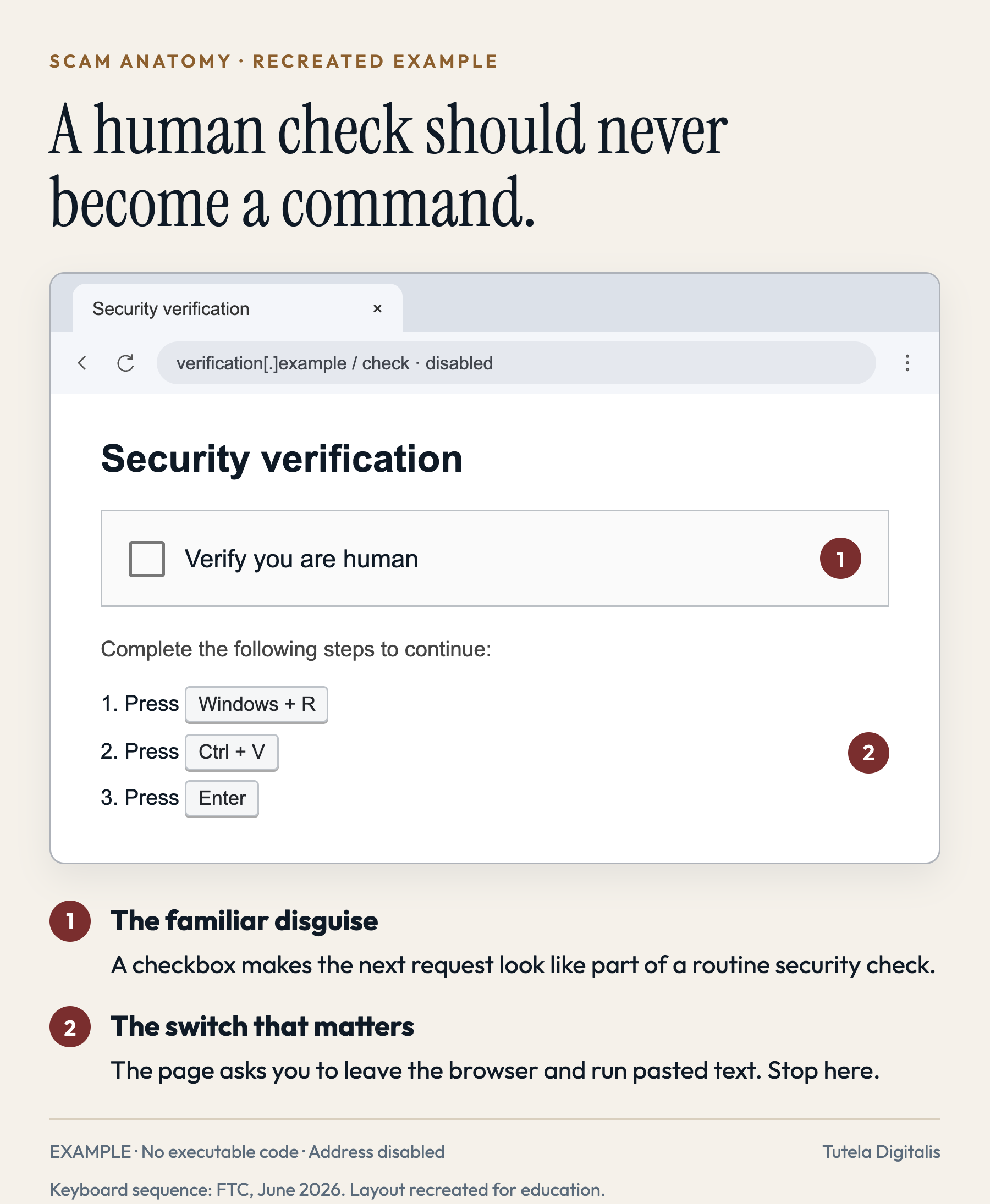
The FTC’s rule is clear: “Real CAPTCHAs won’t ask you to run commands on your device.” A copied Cloudflare or reCAPTCHA design, a security badge, HTTPS or a page you recognize does not override that test. Do not follow the instructions to find out whether the check is genuine.
Microsoft’s ClickFix research describes lures arriving through phishing, malicious advertising and compromised websites. Clicking a button can put the command on the clipboard without showing it plainly. The user is then directed to execute it. Documented payloads include information stealers and remote-access tools; the particular screen does not tell you which payload, if any, ran on your device.
Why “prove you are human” is an effective trap
Tutela Digitalis analysis: the opening request borrows authority from a security routine. You were trying to read an article, watch something or reach a service. The check presents itself as the small obstacle between you and that ordinary task.
The next instruction changes the nature of the interaction. You are no longer answering a question inside a page; you are being asked to give instructions to your computer. The page keeps calling the process “verification,” so the change can feel like another routine step rather than a new decision.
Separating the steps also hides their meaning. A keyboard shortcut seems simple. Pasting seems simple. Confirming seems simple. Together, those actions can execute something you have never inspected. The most useful boundary is therefore about the requested action, not how professional the page looks: a human check has no reason to make you run its command.
ClickFix is the wider social-engineering technique; fake CAPTCHA is one disguise. Other versions claim that a browser needs updating or a file needs fixing. Our guide to scams hosted on trusted AI sites covers that separate route. This guide focuses on the verification screen and what to do after interacting with it.
How to report it without exposing more information
Report the page or advertisement through the platform where you encountered it. If it appeared on a legitimate website, tell the owner through independently found contact details. Provide the address, approximate time and what the page requested; do not send them passwords, full card details or browser-session data.
US readers can report fraud to ReportFraud.ftc.gov or internet crime to FBI IC3. Elsewhere, use your national fraud-reporting or cybercrime channel. For reporting a malicious page itself, see our scam-website reporting guide. Reporting does not replace device cleanup or contacting a bank.
Keep evidence you already have, but do not reopen the site solely to take a better screenshot. Redact personal information before posting publicly. Be cautious of unsolicited offers to “remove every trace” or recover stolen money for an upfront fee; a recovery scam can follow the first incident.
Frequently asked questions
Can a fake CAPTCHA infect my computer if I only clicked the checkbox?
Clicking the checkbox alone does not establish that a command ran. In the command-pasting pattern, the click can copy malicious text to your clipboard; execution is a separate action. Close the page and consider any downloads, permissions or information you also supplied. Do not assume every website attack uses this same mechanism.
I pressed Windows + R but did not paste anything. Am I infected?
Opening the Windows Run dialog by itself does not execute a command. Cancel it and close the suspicious page. If you did paste something and selected OK or pressed Enter, or cannot remember whether it ran, follow the potential-execution steps above.
What if I pasted the command but did not press Enter?
In the Windows Run dialog, cancel without selecting OK or pressing Enter. In a terminal or command shell, pasted text containing a newline can execute immediately, depending on the application and settings. If you pasted into Terminal, PowerShell or another shell, do not rely on remembering that you never pressed Enter; seek help as a possible execution.
Can fake Cloudflare or reCAPTCHA pages be scams?
Yes. A copied logo, checkbox or security-check design does not authenticate a page. A legitimate human-verification check will not require you to run a command in Windows Run, PowerShell or Terminal. Leave the page when it makes that request; do not test the command.
Does ClickFix affect Macs, iPhones or Android phones?
Microsoft has documented ClickFix malware campaigns against macOS as well as Windows. A Windows command will not run on an iPhone or Android phone in the same way, but fake verification pages can target phone users through other actions, including SMS sending, permissions and information theft. Respond to the action you actually took.
Nothing happened after I ran it. Does that mean I am safe?
No. A visible download, error message or new application is not required for a command to do something harmful. Stop sensitive use of the device, disconnect it from networks and get it assessed. Protect potentially exposed accounts from a different trusted device.
Will restarting or clearing browser history remove the malware?
Neither is evidence that an executed command has been undone. Browser cleanup and device remediation are different tasks. Preserve available incident details and use trusted recovery guidance; contact your IT team first for a work device.
Is a clean antivirus scan enough?
A clean result means that scan did not detect a threat; it is not a guarantee about everything a command did or information already stolen. After suspected execution, combine device assessment with account-security steps. A trusted technician or IT team may recommend a reset or reinstall.
Should I change passwords if I only saw the page?
Seeing a page alone does not show that passwords were exposed. Change a password you entered into the suspicious page, and any reused copies, through the real service. If you ran a command or installed software, treat accounts accessible from that device as potentially exposed and secure them from a different trusted device.
Can I paste the command here to find out whether it is safe?
Do not run it or paste it into a terminal to test it. A qualified responder may need the original text, but commands and URLs can contain personal identifiers or access tokens. Use a private, verified support route and redact sensitive information before sharing screenshots publicly.
Need help understanding the request you received? Request a free case review with a short description. Do not send passwords, full card numbers or executable files. If you ran something, prioritize your IT team or trusted device support; our review is not a malware-removal service.
Sources and review notes
Checked on 6 October 2026. Sources establish documented attack patterns and official response guidance, not the prevalence of every variant or a diagnosis of your device. The images are original teaching recreations. The explanation of persuasion and the organization of response steps are Tutela Digitalis analysis.