APPLE PAY · FOLLOW THE CODE
By Peter · 16 October 2026 · 11 min read
Apple Pay scam: the text is bait. The code is the target.
The usual Apple Pay scam does not hack Apple Pay. A text or call says a charge was paused or your Apple Pay was suspended, then steers you to a phone number or a link. Its goal is your card details and the one-time code your bank sends, because that code can approve your card on the scammer's phone. Do not call or tap anything in the message. Check Wallet and your bank's app yourself. If you already shared a code, call the number on the back of your card now.
The message lands while you are doing something else. A purchase you never made, an exact amount, a word like "paused" that suggests the bank caught it just in time. Nothing about it feels like a scam. It feels like a rescue, and the only thing it asks is that you call.
That is the design. In every version reported in recent months, the text is not where the theft happens. The theft happens on the call, or on the page behind the link, at one specific moment: when a real code from your real bank arrives and someone asks you to share it. This guide follows that code, because once you know what it unlocks, the whole scam becomes easy to refuse.
What does the Apple Pay scam text say?
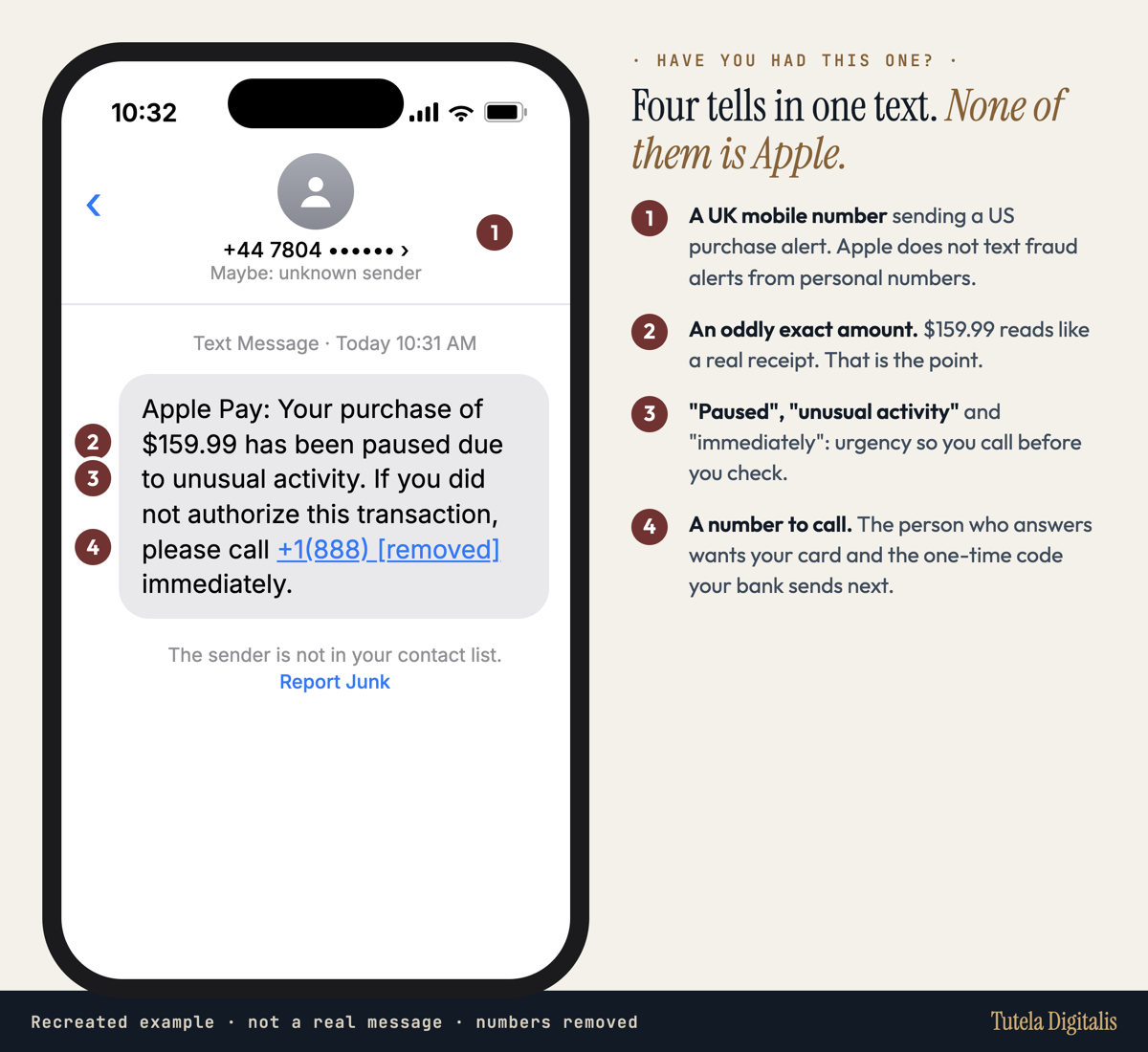
The wording changes, the structure does not: a purchase or a suspension, urgency, and a number or link that leads to the scammer. Here are versions reported in the last three months. Phone numbers are removed.
"Apple Pay: Your purchase of $159.99 has been paused due to unusual activity. If you did not authorize this transaction, please call +1(888) [number removed] immediately."
"Apple Payment Risk Notification: Apple global risk control system captured abnormal consumption on your authenticated Apple ID ... Your iCloud synchronization, member subscription and payment services are about to be restricted. Please call the dedicated service line ... to apply for order cancellation and professional account protection services."
Two more variants matter because they skip the phone call. Which? reported in August 2026 a wave of texts saying Apple Pay has been suspended and that you must re-register your card through a link. And Malwarebytes analysed a fake web page that imitates Apple Pay processing a $657 App Store payment, complete with a "Face ID" spinner and a browser voice reading out an "unauthorized charge", all to push you to call the number on screen. FOX Carolina describes texts claiming more than $8,000 in charges, with a fake case number and a warning that more will be taken within minutes.
How does a fake charge turn into a wallet on someone else's phone?
Here is the sequence the reports describe, beat by beat. For each step: what happens, why it works on a careful person, and the check that breaks it. The analysis is ours; the facts behind it come from the sources named in each step.
STEP 1 OF 5
A charge you never made, at a believable price
The text names a specific purchase: $159.99 "paused due to unusual activity" in one reported version, $509.16 with an order ID in another, more than $8,000 in a third.
Why it works: Loss aversion. Money that seems to be leaving your account demands attention before anything else. An odd, exact amount reads like a real receipt rather than a round, invented number.
Your check: Open Wallet and your bank's own app yourself. If the purchase is not there, nothing was paused. Nothing in the text needs an answer.
STEP 2 OF 5
You make the call, so it feels like your decision
Instead of a link, the message gives a number to call "immediately" if you did not authorize the purchase.
Why it works: Self-initiated trust. People trust a conversation they started more than one that reached them. The scammer turns your own protective instinct into the first step of the con.
Your check: Never use a number from the message. If you want to talk to someone, use the number on the back of your card or the contact route inside the official app.
STEP 3 OF 5
"Apple" hands you to "your bank"
NebraskaLand Bank describes a two-part call: a fake Apple agent confirms the fraud, offers to conference in your bank, puts you on hold, and a second person then impersonates the bank.
Why it works: Authority stacking. Two institutions agreeing feels like independent confirmation. It is one team reading the same script.
Your check: A real company does not transfer you to your bank. Hang up and call the bank yourself on a number you already trust.
STEP 4 OF 5
The code arrives from your real bank
To "cancel the charge" or "verify you", you are asked to read out the one-time code that has just arrived by text. Which? and ESET describe what that code really does: it confirms a new digital wallet for your card, and the wallet is on the criminal's phone.
Why it works: Proof by coincidence. The code genuinely comes from your bank, at exactly the moment the caller predicted. That real message becomes the evidence for the lie around it.
Your check: Read the code's own words before anything else. A code that mentions adding a card, a device or a wallet is approving that change. Nobody legitimate needs you to read it aloud.
STEP 5 OF 5
The card now lives on their phone
Once the wallet is approved, your card can be used from a device you do not own. Some calls go further. Malwarebytes, citing the FTC, notes these callers may ask for remote access or press you to send money by gift card, bank transfer, crypto or payment app; Apple warns of fake support staff asking you to install screen-sharing software or send an Apple Cash payment.
Why it works: Momentum. After several small steps of cooperation, one more request feels like part of the rescue rather than a new decision.
Your check: Stop at the first request to move money, pay through Apple Cash or share your screen. Apple says it will never request payment via Apple Cash or ask for verification codes.
The heart of it is step four. Which? explains that criminals type stolen card details into their own device to set up a wallet, and the push notification or one-time passcode then goes to your phone. ESET describes phishing pages that harvest card details in real time and immediately ask for that code. Approve it, and, in Which?'s words, it is not your own wallet you are approving but the fraudsters'.
That is why scammers need you at all. Your card number can leak from a breach or a fake checkout page. The code cannot. It only exists for a few minutes, on your phone, and the whole performance of fake charges, fake Apple staff and fake bank transfers exists to get you to hand it over in that window.
What should you do at the stage you reached?
Start from what actually happened. Receiving the text costs nothing. Each step after it changes who you need to call.
You only received the text
You called, but shared nothing
You sent money through Apple Cash, Zelle or a gift card
You installed screen-sharing software
Can you get your money back? It depends where the money went
"Apple Pay" covers several different payment routes, and each has different protection. What matters is not the brand on the screen but the account the money actually left from.
| How the money left | Who to contact | What the rules say |
|---|---|---|
| Scammer spent with your credit card from their wallet | Your card issuer, on the number on the card | The FTC says federal law limits your responsibility for unauthorized credit card charges to $50. Dispute promptly; a written billing-error dispute must reach the issuer within 60 days after the first bill showing the charge was sent. |
| Scammer spent with your debit card after you shared a texted code | Your bank, immediately | The CFPB says a transfer made after a caller pretending to be your bank tricks you into giving a texted confirmation code is an unauthorized transfer under Regulation E. How fast you report affects your liability. |
| Charges on Apple Card | In Wallet: Apple Card, the transaction, Report an Issue | Apple's dispute flow covers a compromised card and charges you do not recognize. |
| You sent an Apple Cash payment yourself | Apple Cash Specialist at Green Dot Bank | Pending payments can be cancelled; completed ones cannot. Apple warns that if you pay for something you never receive, you might not get your money back. |
| You bought gift cards and gave the codes | The gift card company, at once | Report it right away and keep the cards and receipts. Recovery is not guaranteed. |
The pattern is uncomfortable but useful. Where the scammer used your card, the law treats the charges as theft from you, even when you were talked into handing over the code. Where you pressed send yourself, the payment usually counts as one you made. That is why any request to move money yourself, by Apple Cash, bank transfer or gift card, should end the call on the spot: it would turn card fraud that the law treats as unauthorized into a payment you made.
For the wider picture of which payment apps protect what, see how PayPal, Venmo, Cash App and Zelle compare on scam protection, and for card disputes specifically, how to get a scam charge refunded on a credit card. In the UK, Which? advises calling 159 to reach your bank's fraud team.
So is Apple Pay safe?
As a payment system, yes, by design. Apple says it does not store the original card numbers you add, that each device gets its own Device Account Number kept in a secure chip, and that payments need Face ID, Touch ID, Optic ID or your passcode. Your transactions stay between you, the merchant and your bank. Nothing in the reported scams breaks any of that.
What they break is the step around the system: the moment a person is asked to approve something. ESET's summary puts it plainly: the common scams manipulate the user rather than exploit a technical gap. A few settings narrow that window:
- Turn on notifications for every card in Wallet, so a payment you did not make shows up within seconds.
- Turn on Stolen Device Protection (Settings, Face ID & Passcode), which ESET recommends so sensitive changes need Face ID.
- Read every one-time code's wording. If it mentions adding a card or a device and you did not start that, it is an attack in progress. Call your bank.
- Only send Apple Cash to people you know. Apple says businesses and government agencies will not ask for payment by Apple Cash.
Selling online? The same family includes fake payment screenshots and overpayment requests. How fake payment screenshots work covers the marketplace side.
How do you report an Apple Pay scam?
Apple asks you to take a screenshot of a suspicious SMS that looks like it is from Apple and email it to reportphishing@apple.com, and to report scam calls in the US at ReportFraud.ftc.gov. The FTC also asks you to forward scam texts to 7726 (SPAM) or use your phone's report junk option. In the UK, forward texts to 7726 and contact your bank through 159. If money moved, report to your bank first: that call is the one with a deadline.
Not sure whether a message is real? The Scam Checker walks you through the warning signs. It cannot verify an account or cancel a charge.
The text wants a reaction; the call wants a number. Give neither. Your bank's number is already printed on your card.
Questions about Apple Pay scams
Does Apple send texts about Apple Pay charges?
Apple's guidance tells you to treat unexpected messages and calls claiming to be from Apple as suspicious and to contact Apple directly instead. NebraskaLand Bank, reviewing a circulating example, says Apple does not send account fraud alerts from personal mobile numbers or direct you to call a number in a text. Check purchases in Wallet and your bank's app, not through the message.
What is the code they ask for in an Apple Pay scam?
Often it is the one-time passcode your bank sends when someone adds your card to a digital wallet. Which? and ESET describe criminals entering stolen card details into their own device, which triggers that code to your phone. If you read it out or type it into a page, you may be approving your card on the scammer's phone.
Is Apple Pay safe to use?
Apple says Apple Pay does not store your original card number on the device or Apple's servers, uses a device-specific account number and requires Face ID, Touch ID, Optic ID or your passcode. The common scams work by persuading the owner, not by breaking that design. Keep codes private, turn on card notifications and do not call numbers from unexpected messages.
I read out a code. What should I do first?
Call the number on the back of your card now. Say you shared a one-time code with a caller and ask the bank to block the card, check for wallets or devices added without you and review recent charges. Then secure your Apple Account if you shared its password or code. Speed matters for both stopping charges and the protections that depend on prompt reporting.
Can I get money back from an Apple Pay scam?
It depends on where the money went. Charges made with your credit card from a scammer's wallet are disputed with your card issuer; US law caps your liability for unauthorized credit card charges at $50. For debit cards, the CFPB says transfers made after a third party tricks you into sharing a texted confirmation code count as unauthorized under Regulation E. Money you sent yourself through Apple Cash is much harder to recover.
Can I cancel an Apple Cash payment I sent to a scammer?
Only while it is pending. Apple says a pending person-to-person payment can be cancelled from the transaction in Wallet. Once the status reads Completed, you cannot cancel it. Contact an Apple Cash Specialist at Green Dot Bank, which provides Apple Cash services, and report the scam; recovery is not guaranteed.
How do I report an Apple Pay scam text?
Apple asks you to email a screenshot of a suspicious SMS that looks like it is from Apple to reportphishing@apple.com. In the US you can also forward the text to 7726 and report the scam at ReportFraud.ftc.gov. In the UK, Which? points to 7726 for scam texts and 159 to reach your bank's fraud team.
Sources and review
Every source was read at origin on 16 October 2026. Quoted scam texts are reproduced from the publications named, with phone numbers removed. The legal protections described are US federal rules unless stated; your card agreement and your bank's investigation decide individual outcomes, and no recovery is promised.