UK · DOES IT TEXT YOU? · THE CALENDARUpdated 6 October 2026 · 9 min read
Genuine HMRC texts: check the message before you act.
HMRC does send texts, including refund updates and overdue-tax reminders. That gives impersonators a believable starting point. Compare the message with the published campaign, then check the matter through HMRC independently.
6 Oct
official guidance checked in 2026
5–9 Oct
2026 Self Assessment overdue text campaign
60599
HMRC's number for forwarding suspicious texts
14 Dec 2026
when the current debt recovery campaign ends
The short answer
Yes, HMRC sends genuine texts. Some can contain links. HMRC’s guidance distinguishes information and survey links from refund messages that must not contain links. It says texts will not request personal or financial information. Check the particular campaign, then verify independently. The latest additions include Self Assessment overdue texts for 5–9 October 2026 and VAT registration updates from 5 October. A matching sender or subject does not authenticate the message.
"HMRC will never ask for personal or financial information when we send text messages."
A refund message and a survey invitation have different rules. Treating every link as proof of fraud can misclassify genuine contact; treating every familiar-looking message as safe can expose you to an impersonator. Use the campaign details as a check, not permission to trust the sender.
Genuine HMRC text campaigns: October 2026 checks
The official HMRC text-message guidance was updated on 5 October 2026. The table puts the latest additions first. HMRC also links to guidance covering contact through more than one channel; absence from this table alone does not prove fraud.
The calendar · genuine HMRC text campaignsGOV.UK, updated 5 Oct 2026 · checked 6 Oct 2026
Self Assessment tax overdue
5 to 9 Oct 2026
check your account for overdue tax; no website links
VAT registration updates
from 5 Oct 2026
application progress or a reminder to answer an email or letter; no website links
Retirement annuity relief
from 29 Sep 2026
review contributions on your 2024–25 return and correct errors; no website links
International debt
21 Sep 2026 to 19 Mar 2027
check your account and search GOV.UK for non-resident payment enquiries
P800 tax refunds
added 24 Aug 2026
a refund is due after a letter went unanswered; no personal details requested, no link
Debt recovery
15 Jun to 14 Dec 2026
a missing payment, a credit on the account, or a hold with a bank
Child Benefit
updated 7 May 2026
claim received, extension requests, opt-in and opt-out confirmations, account changes
PAYE and Self Assessment complaints
from 27 Apr 2026
the status of a complaint review, and that a call is coming
PAYE Settlement Agreement
from 28 Feb 2026
a summary after a helpline call, and how long a query will take
Corporation Tax
added 5 Feb 2026
a summary after a helpline call, confirmation a query is being processed, timescales
Fast parcel operator drivers
from 18 Jun 2025
confirmation of an interview letter, appointment reminders
Self Assessment tax refunds
added 25 Mar 2025
a refund is being processed and when the payment will arrive
Self Assessment penalty appeals
standing
an appeal is under review, and when to expect the outcome
Confirmation and update messages
standing
a claim, form or letter has been received
Post-contact surveys
standing
a feedback request after a call or a compliance check
Branded messages
standing
shown as HM Revenue and Customs, with the HMRC logo and verified sender information
Selected campaigns and message formats checked against HMRC’s guidance on 6 October 2026. This is a comparison aid, not authentication of a particular message. Check the linked official list for additions and changes.
A date window is useful context, not proof of origin. Criminals can copy a real campaign while it is running. Find the relevant HMRC service on GOV.UK yourself if a message concerns a debt, refund or application.
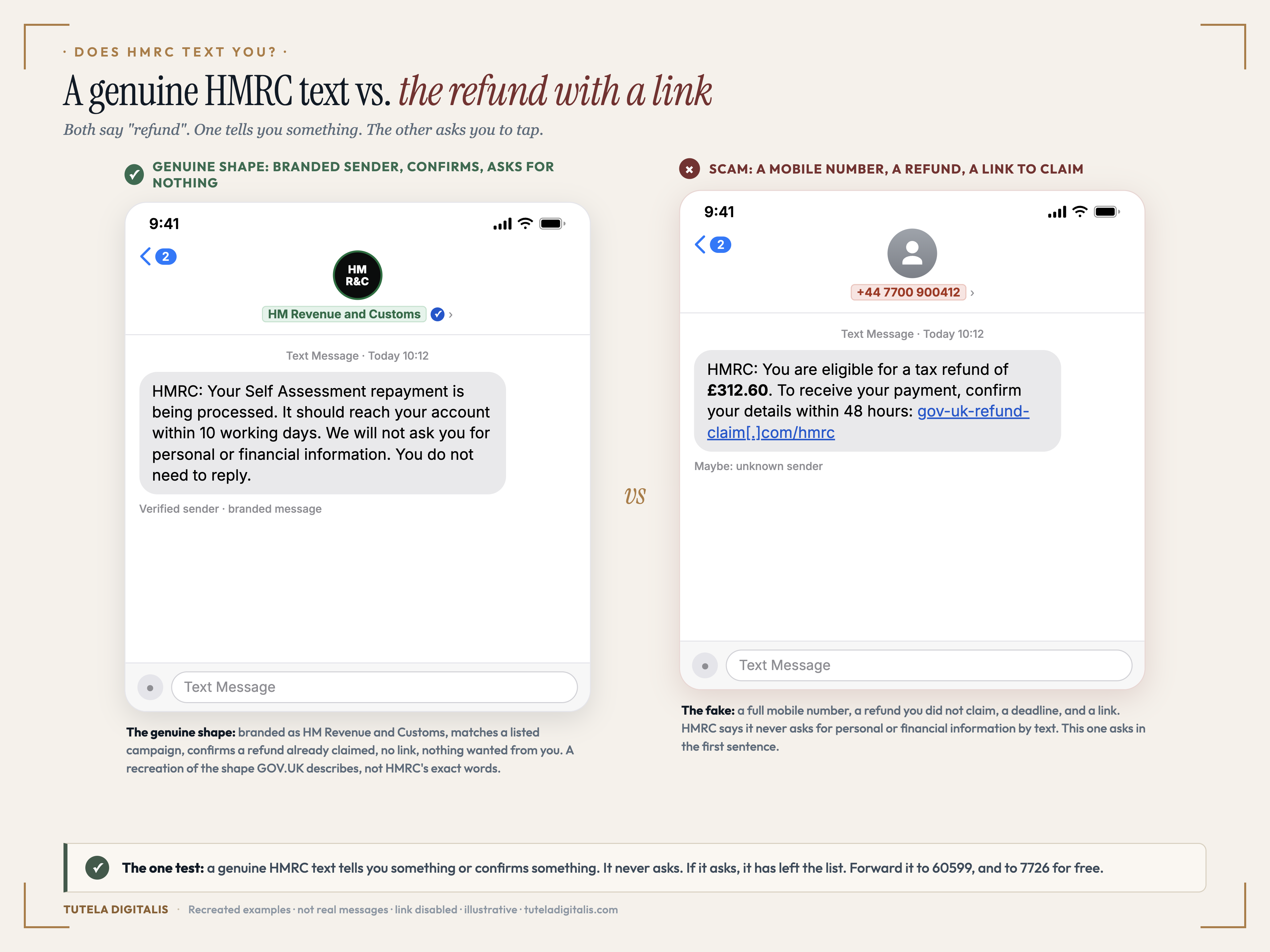
Recreated examples, not screenshots of real messages. The genuine one is a recreation of the shape GOV.UK describes for the Self Assessment refund campaign, not HMRC's verbatim wording. The fake follows the refund-with-a-link message GOV.UK shows on its phishing examples page. The link is inert.
Can genuine HMRC texts contain links?
Yes. A GOV.UK information link, a webchat link and a survey invitation are not the same as a refund link requesting your bank details. Check the rules for the named campaign rather than judging every text by one shortcut.
A message can resemble genuine contact and still be fraudulent. Do not send sensitive information in reply. If you need to act, find the official service independently instead of following instructions from an unverified sender.
How to check an HMRC text without trusting the sender
—Compare the purpose and dates. Use the official campaign guidance linked above. A vague reference to tax or a copied logo is not enough.
—Choose your own route to HMRC. Open the official app or GOV.UK yourself. For an issue you cannot find in your account, locate the relevant HMRC contact service there.
—Keep the message for reporting. Do not use its callback number to authenticate it. Forward suspicious contact to the reporting routes below.
From the field. A convincing message gives you a reason to believe. Independent verification gives you a reason to act. Keep those two decisions separate.
Not seeing an issue in your online account is not a final verdict. Different HMRC services use different channels. If the matter is unclear, find the relevant contact details on GOV.UK rather than returning to the unexpected message.
A message claiming to be from another department needs a different check. Our guide to DVLA, DWP and NHS texts brings those organisations’ published contact rules together alongside HMRC’s.
Where to send a bogus one, and why each route matters
—60599, HMRC's own number for suspicious texts. Forward the message as it arrived. HMRC notes that network charges apply. This is how HMRC learns which lures are running and gets the lookalike sites taken down.
—phishing@hmrc.gov.uk, for suspicious emails. The same team; attach or forward the email rather than retyping it.
—7726, free, to your network. Forwarding to 7726 (it spells SPAM) goes to your mobile operator, which can investigate and act on abusive messages.
—Report Fraud, if you lost money or entered details. Action Fraud was replaced by Report Fraud in December 2025. Our UK reporting guide has the current map, and explains when the UK authorised push payment reimbursement rules may apply.
If you already tapped, or already typed
1.Call your bank on the number on your card and say exactly what you entered on the page. Ask them to watch the account or reissue the card.
2.If you disclosed a password, change it through the genuine service from a trusted device, including anywhere you reused it. Review the account’s available security settings.
3.Forward the text to 60599 and 7726, then report the fraud to Report Fraud if money moved or details were taken.
4.Check what the money route was. Card disputes and bank-transfer reimbursement have different eligibility rules; whether a bank refunds scammed money depends on which one you have.
5.Expect the second call. Anyone who contacts you afterwards offering to recover the money for a fee is running the recovery scam.
A familiar sender is a starting point, not a conclusion. Verify the matter through a route you chose yourself.